
Command and Programming Manual
Rev 1.7.3
Applicable to the public commands and data interfaces of HiPNUC IMU / AHRS / MRU products
Specific features are subject to the actual product model, firmware version, and delivered configuration
© 2016–2026 Beijing HiPNUC Electronic Technology Co., Ltd. All rights reserved. The information contained in this document is subject to change without notice.
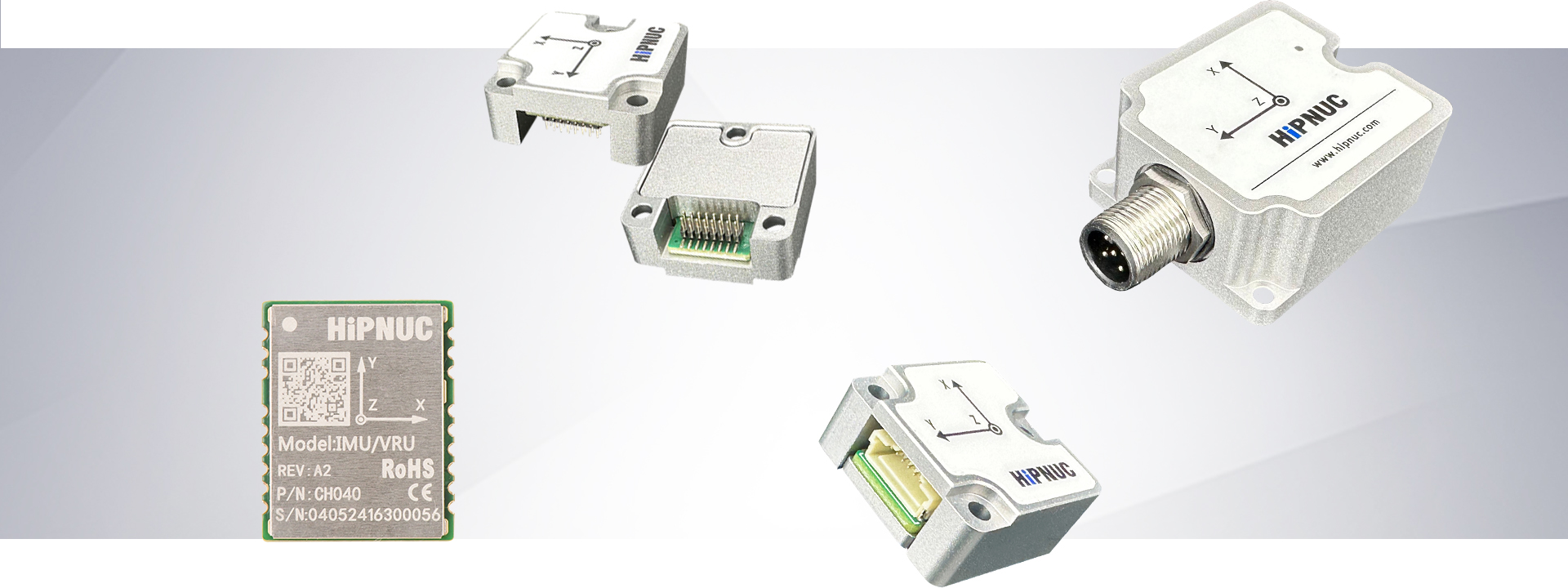
Document Scope and Version
About This Manual
This manual is the Command and Programming Reference for HiPNUC IMU / AHRS / MRU products, intended for engineers who need to interface directly with the module, configure parameters, parse data, or integrate it into a higher-level system.
Applicable products: the public programming interfaces of HiPNUC IMU / AHRS / MRU standard products. Actual functionality depends on the specific product model, firmware version, and delivered configuration; sensors, CAN, RS-485, or MRU functions that are not enabled produce no corresponding output. This manual covers only the programming and data interfaces; for pin definitions, mechanical dimensions, power supply, and electrical specifications, refer to the hardware manual of the corresponding product.
Applicable firmware version: 1.6.9 and later. Some features require newer firmware. Send LOG VERSION over the serial port, or check the current firmware version in CHCenter.
Historical manual: Rev 1.3.0.
NOTE
version number conversion: the APP_VER returned by LOG VERSION is an integer-encoded value: major version = APP_VER / 100, minor version = (APP_VER % 100) / 10, revision = APP_VER % 10 (all divisions are integer divisions, rounded down). For example, APP_VER=172 indicates firmware 1.7.2. CHCenter displays the dotted version directly, and the two sources are consistent.
Quick Start Procedure
Connect power, ground, and the communication interface according to the product hardware manual, then choose the corresponding path below. These steps only query information or receive data; they do not require changing configuration, restoring factory defaults, or upgrading firmware first. Use the device's current communication settings; typical defaults are only a reference for first-time integration.
| Interface | Connection and verification | Protocol reference |
|---|---|---|
| ASCII serial | Use 8N1, typically 115200 bps. Send LOG VERSION terminated by \r\n; reading PNAME and APP_VER confirms communication | ASCII Command Reference |
| Modbus RTU | Confirm RS-485 support and the current baud rate and node ID (typically 0x50). Read 0x70–0x82 using the version-query example; check the response address, function code, data length and CRC before decoding the version | Version query, Modbus RTU Protocol |
| J1939 / CANFD83 | Confirm protocol support, wiring, termination and current CAN settings. Classic CAN is typically 500 kbit/s; see CANFD83 for dual bit rates and FD/BRS settings. Receive 29-bit extended frames and check PGN and data length first | CAN integration checks, PGN Message List, CANFD83 |
Opening a serial port does not prove that the device is communicating. Verify a valid response or frame as described above; if there is no response, start with Fault Diagnosis.
Common Tasks
| Task | Where to start |
|---|---|
| Configure output frames and rates | LOG Commands |
| Change baud rate or Modbus node ID | Changing Communication Parameters |
| Select 6-axis / 9-axis mode or mounting orientation | Product Features and Configuration |
| Mount the module off-level or output in the ROS convention | Mounting Orientation, Output Data Axes |
| Use 9-axis heading or calibrate the magnetometer | Magnetic Calibration and Magnetic Environment |
| Decode HI91 / HI83 or bus measurements | Basic Conventions → Unified Data Dictionary → Serial Binary, Modbus or CAN |
| Use MRU wave compensation output | Product-Specific Features → Output Coverage Overview |
| Diagnose missing responses, communication loss, data or heading errors | Fault Diagnosis |
Notational conventions: command keywords, registers, and hexadecimal values use monospace font; callout boxes use Warning (misuse risks) and Note (supplementary information and examples). Shared definitions are in Basic Conventions; protocol chapters provide formats, fields, and examples.
Basic Conventions
This chapter centrally defines the coordinate systems, attitude representations, heading conventions, data types and byte order, timestamps, and status words used throughout the manual. Every protocol chapter references this chapter and does not redefine them. Read this chapter before parsing any data.
Coordinate Systems and Direction Conventions
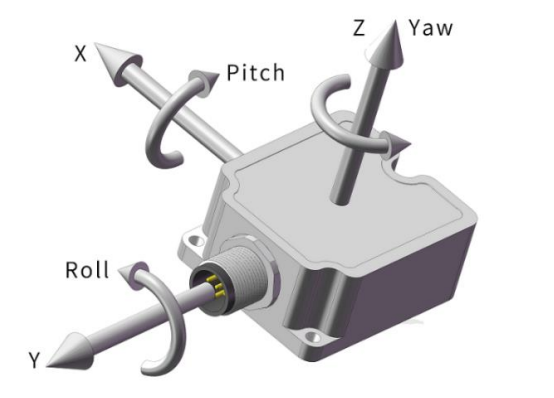
The module involves three right-handed coordinate systems:
| Frame | Symbol | Definition |
|---|---|---|
| Sensor frame | — | Rigidly attached to the module; the X/Y/Z axis directions are printed on the housing/PCB silkscreen. It is the reference for the mounting orientation code. |
| Body frame | b | The frame the output data are expressed in. The mounting orientation URFR declares where the printed arrows point on the vehicle, and the module aligns the data to the vehicle accordingly; the output data axes COORD then decide which convention the data X/Y/Z follow on the vehicle: the default Right-Front-Up (RFU), or Front-Left-Up (FLU) as in ROS. With the default URFR 24 and COORD 0 and the module lying flat, the body frame coincides with the sensor frame. |
| World frame | n | The reference frame for attitude: East-North-Up (ENU), X east, Y north, Z up. Where heading zero lies depends on the operating mode and the output data axes; see Heading (yaw) Convention. |
The positive rotation direction follows the right-hand rule: point the right thumb along the positive axis, and the direction in which the fingers curl is the positive rotation direction about that axis.
Attitude Representation
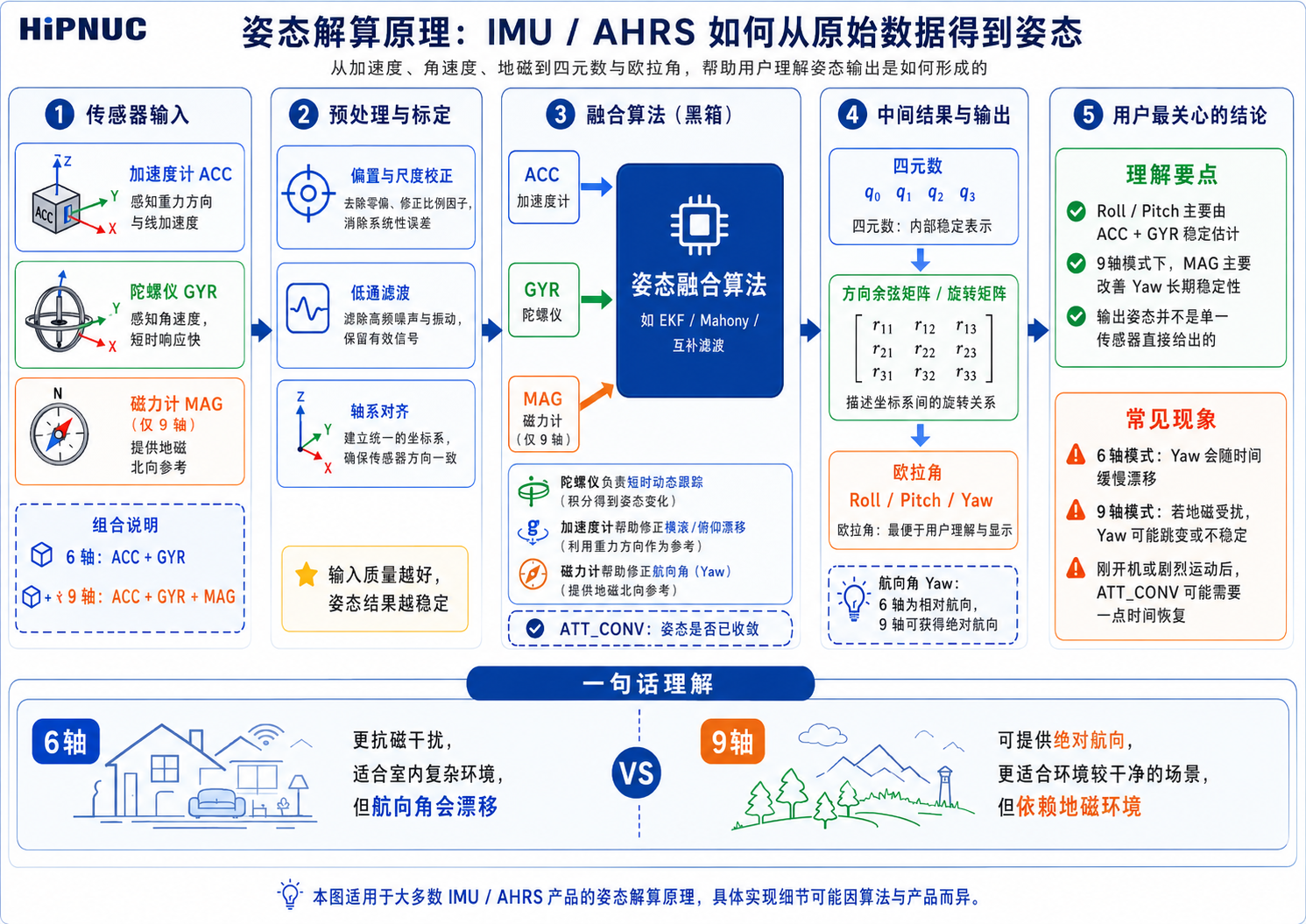
The module simultaneously outputs two attitude representations: Euler angles and quaternion.
- Euler angles: roll
roll, pitchpitch, headingyaw, in degrees. Ranges: roll ∈ [−180°, 180°], pitch ∈ [−90°, 90°], yaw ∈ [−180°, 180°]. - Quaternion: order WXYZ (
is the scalar part), representing the rotation from the body frame to the world frame.
The Euler rotation order, the axis each angle is about and their positive senses follow the output data axes. This is where formulas are most often misapplied:
| Output data axes | Body frame | Rotation order | roll about | pitch about | yaw about | Positive pitch | Positive roll |
|---|---|---|---|---|---|---|---|
Right-Front-Up (COORD 0, default) | RFU | 312 (Z, then X, then Y) | Y | X | Z | Nose up | Right side down |
ROS (COORD 4, REP-103) | FLU | 321 (Z, then Y, then X) | X | Y | Z | Nose down | Right side down |
The conversion formulas are in "Appendix A". The two conventions have different body axes and opposite pitch signs, and their 9-axis heading zeros differ (see Heading (yaw) Convention). After switching, extract the Euler angles from the quaternion with the matching formulas; do not add a fixed angle to one of them.
NOTE
pitch ±90° singularity: when pitch approaches ±90°, the Euler angles have a gimbal-lock singularity and roll/yaw are no longer unique. For high-elevation attitudes, use the quaternion.
Heading (yaw) Convention
WARNING
heading is the most easily confused point: the module's representation of yaw is not uniform across the different protocols/frames, so refer to the table below for understanding.
| Output location | Heading representation | Positive direction |
|---|---|---|
| HI91 / HI83 / CANopen | Raw yaw, range ±180° | Counter-clockwise positive |
| Modbus YAW register | Raw yaw, range ±180° | Counter-clockwise positive |
| J1939 YAW message (first 4 bytes) | Compass heading, 0–360° | Clockwise positive |
| J1939 YAW message (last 4 bytes) | Raw yaw, ±180° | Counter-clockwise positive |
- 6-axis and other relative-heading modes: yaw is a relative heading, 0 at power-on, drifting slowly over time; the same under both output data axes.
- 9-axis mode: yaw references magnetic north. Under Right-Front-Up (
COORD 0) yaw is 0 with the vehicle nose pointing north; under ROS (COORD 4) it follows REP-103 and is 0 with the nose pointing east, so the same orientation reads 90° more than under Right-Front-Up. The module does not output a true-north-corrected heading; if your system needs true north, the host should correct it using the deployment location, date and a magnetic-declination model. - Compass heading (J1939
0xFF41first 4 bytes) is always computed in Right-Front-Up: the Right-Front-Up yaw negated and wrapped to 0–360°. In 9-axis mode it is 0 with the nose pointing north and 90° with the nose pointing east, whatever the output data axes. The raw yaw fields follow the output data axes.
Data Types, Byte Order, and Scale Factors
Data types:
| Symbol | Meaning | Bytes |
|---|---|---|
| u8 / u16 / u32 / u64 | Unsigned integer | 1 / 2 / 4 / 8 |
| i8 / i16 / i32 | Signed integer (two's complement) | 1 / 2 / 4 |
| float | IEEE-754 single-precision float | 4 |
| double | IEEE-754 double-precision float | 8 |
Byte order:
| Protocol | Byte order |
|---|---|
| HiPNUC binary (HI91/HI83) | Little-endian (low byte first) |
| J1939 / CANopen | Little-endian |
| Modbus RTU | Big-endian (2 bytes per register, high byte first) |
Bit numbering convention: in this manual all bit fields (such as MAIN_STATUS and the HI83 data bitmap) use bit0 for the least significant bit (LSB), with bitN being the N-th bit counted from the least significant bit; thus the bit mask 0x00000FFF is bit0–bit11, and 0x000000FF is bit0–bit7.
Scale factor convention: in integer protocols the physical quantity is recovered with a scale factor, physical value = raw value × scale factor. For example, a Modbus acceleration raw value of 1000 with a scale factor of 0.00048828 gives a physical value = 0.488 G. Floating-point protocols (the float/double fields of HI91/HI83) are already in engineering units, with a scale factor of 1.
WARNING
the same physical quantity has different types/scale factors/units across different protocols; see "Unified Data Dictionary" for details.
Time and Timestamps
The meaning of system_time in the data frame (u32 for HI91, in ms) varies with the synchronization state:
- UTC synchronization not completed: a local millisecond counter, not absolute UTC; wrap-around behavior depends on the firmware version.
- UTC synchronization completed: the current-day UTC millisecond count (from 00:00:00 of the current day, wrapping every 24 h).
The synchronization state can be determined from the UTC_UNSYNC bit of MAIN_STATUS (see "MAIN_STATUS Status Word"). UTC synchronization is achieved via PPS + a serial time message; for hardware wiring and timing requirements see "Synchronization Function".
Current-day UTC millisecond timestamp:
| Item | Value |
|---|---|
| Range | 0 ~ 86,399,999 ms |
| Corresponds to | 00:00:00.000 ~ 23:59:59.999 |
| Resolution | 1 ms |
After UTC synchronization, convert to a display time using hh=system_time/3600000, mm=(system_time/60000)%60, ss=(system_time/1000)%60, ms=system_time%1000. Conversion examples:
| system_time (ms) | Corresponding current-day UTC time |
|---|---|
| 0 | 00:00:00.000 |
| 3,661,000 | 01:01:01.000 |
| 43,200,000 | 12:00:00.000 |
| 86,399,999 | 23:59:59.999 |
NOTE
The timestamp contains no date or time-zone information. After UTC synchronization, interpret it as UTC+0; for local time, the host should add the time-zone offset. HI83 additionally provides system_time_us (u64, local high-resolution microseconds) and utc (full year-month-day hour-minute-second); whether utc is valid UTC is likewise determined by UTC_UNSYNC.
MAIN_STATUS Status Word
MAIN_STATUS is a 16-bit status word that appears in outputs such as HI91 and HI83.
It is a collection of status bits, not a single error code. A nonzero value does not necessarily indicate a fault, and not all bits need to be zero before using the data. Check the relevant bits for the task: convergence for attitude, magnetometer aiding and field status for 9-axis heading, and time synchronization for absolute UTC. The bit definitions follow.
| Bit | Name | =1 meaning | =0 meaning |
|---|---|---|---|
| 0–2 | Reserved | — | — |
| 3 | WB_CONV | Gyro bias not converged, accuracy is poor (recommend staying static for 3~5 s) | Bias well converged |
| 4 | MAG_DIST | In 9-axis mode the runtime magnetic-field confidence is abnormal (field out of range, rotation verification not yet completed, or magnetic disturbance detected), and the heading angle may degrade to inertial hold | Magnetic-field confidence normal, or in 6-axis mode |
| 5 | ACC_SAT | Accelerometer range saturated currently or within the last 2 s | No accelerometer saturation for 2 consecutive s |
| 6 | GYR_SAT | Gyroscope range saturated currently or within the last 2 s | No gyro saturation for 2 consecutive s |
| 7 | ATT_CONV | Attitude estimate not sufficiently converged, accuracy is poor (recommend staying static for a moment) | Attitude accuracy normal |
| 8 | Reserved | — | — |
| 9 | STATIC | The device is judged to be static | The device is not judged to be static |
| 10 | MAG_AIDING | Magnetometer aiding mode enabled (9-axis mode); the actual magnetic update each cycle is still subject to magnetic-field confidence and algorithm de-weighting control | Magnetometer aiding mode off (6-axis mode) |
| 11 | UTC_UNSYNC | UTC not synchronized; system_time is a local millisecond counter | UTC synchronized; system_time is the current-day UTC milliseconds |
| 12 | SOUT_PULSE | The current data frame corresponds to one SOUT pulse output | The current frame does not correspond to a SOUT pulse |
| 13 | Reserved | — | — |
| 14–15 | Reserved | — | — |
NOTE
the UTC_UNSYNC bit means "1 indicates not synchronized"; do not misread it literally as "synchronized". SOUT_PULSE is used to time-synchronize and align with the sampling timing of an external acquisition device or host.
Reserved bits: reserved bits are used internally by the firmware and their values are not guaranteed to be 0; the client should mask and ignore all reserved bits and only evaluate the bits defined in this table, to ensure forward compatibility.
Product Features and Configuration
This chapter introduces the module's configuration items, use cases, and operating procedures by function. For specific command syntax, see "ASCII Command Reference"; for output data formats, see "Unified Data Dictionary" and the subsequent protocol chapters.
Configuration and Saving
After changing configuration, verify the result by reading parameters back or checking actual output, then perform the corresponding save operation for compatibility across firmware versions. For settings that require a restart, verify again after restarting. Follow the specific procedures for communication changes, attitude resets and calibration.
| Interface and request format | Save configuration | Reset |
|---|---|---|
| ASCII | SAVECONFIG | REBOOT |
| Modbus | Write 0x0000 to 0x00 | Write 0x00FF to 0x00 |
| J1939 | Write 0x00000000 to configuration address 0x0000 | Write 0x000000FF to configuration address 0x0000 |
Changing Communication Parameters
Before making changes, record the current port, baud rate and node ID, and confirm that the host supports the target settings. These procedures assume communication is already established; for first-time integration, complete communication verification first.
ASCII Serial Baud Rate
SERIALCONFIG takes effect immediately. When changing the connected port, switch the host to the new baud rate after sending the command, use LOG COMCONFIG to confirm communication and configuration, then run SAVECONFIG. Changing another port does not change the connected port's baud rate. See System Commands for syntax and supported rates.
Modbus Baud Rate
0x04 configures the COM1 baud rate and takes effect after reset. Using the current rate, write and read back 0x04; after confirming the rate index, write 0x0000 to 0x00 to save, then 0x00FF to reset. After restart, switch the host to the new baud rate and read registers again to verify communication. Reset may interrupt the response; confirm the result from a valid response after restart. See Common Configuration Examples for rate-specific messages.
Modbus Node ID
The node ID takes effect immediately, without reset. Read 0x05 using the new ID to confirm, then use the new ID to write 0x0000 to 0x00 to save. Update the ID and recompute the CRC in subsequent messages. The normal echo for the ID-changing request still uses the old ID; confirm success with a valid readback using the new ID. See Common Configuration Examples for message formats.
If communication is lost after a change, use Fault Diagnosis to check that host and device settings match; do not immediately restore factory defaults.
Operating Mode (Attitude / Heading Profile)
The module selects the attitude / heading profile via CONFIG ATT MODE (see "CONFIG Configuration Commands"). The common public profiles are as follows:
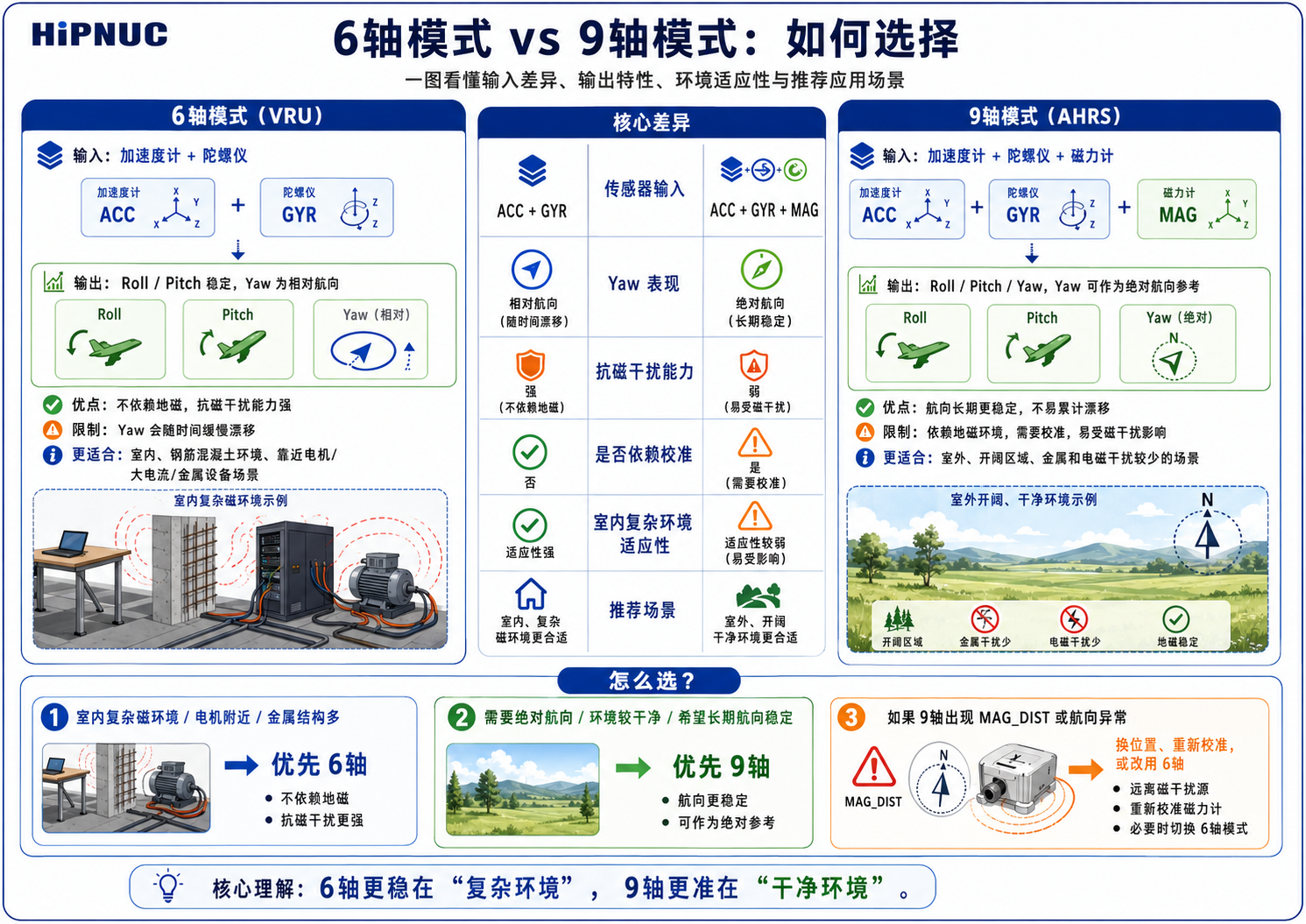
- 6-axis (VRU) mode: Uses only the accelerometer + gyroscope, outputting relative heading (heading is 0 at power-on), unaffected by magnetic interference, suitable for magnetically complex scenarios such as indoors, robotics, and near motors.
- 9-axis (AHRS) mode: Fuses the magnetometer, outputting absolute heading (relative to magnetic north). It must be used in a clean magnetic environment with magnetic calibration completed (see "Magnetic Calibration and Magnetic Environment").
- Dedicated motion profiles: Optimized for specific body motion constraints, such as humanoid robots, low-speed ground platforms, and low-dynamic inclinometers. For the specific selectable values, see "CONFIG ATT MODE".
WARNING
Use 9-axis with caution indoors/on robots: Indoor environments and motor magnetic fields easily interfere with the magnetometer, causing heading errors. For such scenarios, 6-axis mode is recommended as the preferred choice.
Output Data Axes (COORD)
CONFIG IMU COORD <VAL> selects which convention the output X/Y/Z follow on the vehicle; it takes effect after a reset or power cycle. Its job differs from the mounting orientation: the mounting orientation declares how the module sits on the vehicle, while the output data axes only decide how the data are expressed. Once the mounting orientation is set, the data follow the vehicle, not the arrows printed on the housing. In CHCenter, set it under "Output Data Axes" on the "Work Mode" page of the configuration dialog.
| VAL | Output data axes | Data X / Y / Z | Euler order | 9-axis heading zero |
|---|---|---|---|---|
| 0 | Right-Front-Up (default) | Vehicle right / front / up | 312 | Nose pointing north |
| 4 | ROS (REP-103) | Vehicle front / left / up | 321 | Nose pointing east |
- Applies to acceleration, angular rate, magnetic field, quaternion and Euler angles; see Attitude Representation for the positive sense of each angle. Velocity and position are always output as east-north-up.
- Inclination, compass heading (J1939
0xFF41first 4 bytes) and MRU outputs are always computed in Right-Front-Up and do not follow this setting. - In 6-axis and other relative-heading modes, heading is 0 at power-on under either choice.
- For ROS, choose
4: set the driver'sframe_idtobase_link(or a frame with no rotation from it), with no extra TF; see the official ROS driver notes. - Set it with Modbus register
0x07or J1939 address0x0007. Integrated-navigation products accept only0in integrated-navigation operating modes.
NOTE
On firmware V1.7.2 and earlier, COORD 4 is North-West-Up (NWU), unlike the table above.
Mounting Orientation (URFR)
When the module is not mounted in the default orientation, CONFIG IMU URFR <CODE> (see "CONFIG Configuration Commands") declares where the X/Y/Z arrows printed on the housing or PCB silkscreen point on the vehicle, and the module aligns its output to the vehicle accordingly. It takes effect after a reset or power cycle. The mounting orientation only describes the installation and is independent of the output data axes: with ROS selected the data are output as Front-Left-Up, and the code stays the same.
CODE is written as a three-digit number ABC (a 2-digit value is equivalent to padding with a leading zero, e.g., 24 = 024): A/B/C indicate which sensor-frame direction the vehicle X (right) / Y (front) / Z (up) axes correspond to, respectively:
| Digit | Direction | Digit | Direction |
|---|---|---|---|
| 0 | +X | 1 | −X |
| 2 | +Y | 3 | −Y |
| 4 | +Z | 5 | −Z |
The three directions must form a right-handed frame (X × Y = Z), giving 24 legal codes. In practice, look up the module's physical orientation on the vehicle in the table below; there is no need to apply the encoding rule by hand. The "Arrow directions" column gives where the printed X / Y / Z arrows actually point on the vehicle, taken from the vehicle's point of view: front is where it drives, right is the driver's right-hand side.
In CHCenter, the "Installation" page of the configuration dialog picks the orientation with two drop-downs, "X arrow points to" and "Y arrow points to"; Z follows. They match the first column of the table one-to-one. The Modbus and J1939 configuration windows have the same page; inclinometer products do not.
| Arrow directions (X, Y, Z) | Command | Description |
|---|---|---|
| Right, Front, Up | URFR 24 | Default horizontal mounting (=024) |
| Right, Back, Down | URFR 35 | Flipped upside-down about X (=035) |
| Right, Down, Front | URFR 43 | Side mounting (Right+Down) |
| Right, Up, Back | URFR 52 | Side mounting (Right+Up) |
| Left, Front, Down | URFR 125 | X reversed, Z downward, inverted |
| Left, Back, Up | URFR 134 | X/Y reversed, Z upward |
| Left, Up, Front | URFR 142 | Left-facing vertical mounting, Y up |
| Left, Down, Back | URFR 153 | Left-facing vertical mounting, Y down |
| Front, Right, Down | URFR 205 | Forward mounting, X along the vehicle nose |
| Back, Right, Up | URFR 214 | Backward mounting, Y to the right |
| Up, Right, Front | URFR 240 | Vertical mounting, X up |
| Down, Right, Back | URFR 251 | Vertical mounting, X down |
| Front, Left, Up | URFR 304 | Forward mounting, Y to the left |
| Back, Left, Down | URFR 315 | Backward inverted mounting |
| Down, Left, Front | URFR 341 | Left-facing vertical mounting, X down |
| Up, Left, Back | URFR 350 | Left-facing vertical mounting, X up |
| Front, Up, Right | URFR 402 | Forward vertical mounting, Z to the right |
| Back, Down, Right | URFR 413 | Backward vertical mounting |
| Down, Front, Right | URFR 421 | Vertical mounting, X down, Z to the right |
| Up, Back, Right | URFR 430 | Vertical mounting, X up, Z to the right |
| Front, Down, Left | URFR 503 | Forward vertical mounting, Z to the left |
| Back, Up, Left | URFR 512 | Backward vertical mounting |
| Up, Front, Left | URFR 520 | Vertical mounting, X up, Z to the left |
| Down, Back, Left | URFR 531 | Vertical mounting, X down, Z to the left |
After setting it, run SAVECONFIG and REBOOT, then raise the vehicle's nose and lower its right side to check the output: raising the nose gives positive pitch under Right-Front-Up and negative pitch under ROS; lowering the right side gives positive roll under both. Codes not in the table are rejected with ERR. After the mounting orientation is changed and the module restarts, a previously saved attitude zero no longer applies; set it again for the new installation (see attitude reset persistence).
Attitude Calibration
CONFIG ATT RST (see "CONFIG Configuration Commands") sets user attitude zeros: zero all, heading reset, relative zero, auto-leveling, and cancel leveling. The device must be stationary during execution; auto-leveling takes effect only when the device is within ±5° of level.
CONFIG USRCAL (see "CONFIG Configuration Commands") is used for user-level gyro scale calibration, calibrating the gyro Z-axis scale factor to reduce the long-term heading accumulation error of a horizontally rotating body. This feature is suitable for controllable horizontal rotation scenarios such as AGVs, large horizontally moving robots, and turntables; it is not suitable for handheld arbitrary rotation or scenarios where the rotation angle cannot be accurately measured. Operating steps:
- Place the module together with the body on level, flat ground, with a stable ambient temperature and no strong vibration;
- Send
CONFIG USRCAL START <ANGLE>(angle 360°~3600°); - Rotate horizontally at a constant 20~100 deg/s through the set angle (any direction, no pausing, no abrupt change);
- After the rotation is complete, send
CONFIG USRCAL STOP; a successful return isOK. It is recommended that the actual rotation angle, controlled manually or by a turntable, not deviate by more than ±5°; if the actual angle deviates too much from the set angle, the calibration will introduce a new scale error.
Common failure causes: improper rotation (too fast, too slow, pausing midway, or obvious wobbling), environmental vibration, and the actual rotation angle deviating too much from the set value.
Synchronization Function
The module's synchronization function relies on the SYNC_IN/PPS and SOUT pins and covers three categories of use. The figure below shows logic-analyzer-measured waveforms, taking the SYNC_IN trigger mode as an example: a rising edge on SYNC_IN/PPS triggers the output of that frame; the module first outputs the SOUT pre-frame pulse before sending the data frame, and the data frame follows immediately after the falling edge of the pulse. Note that the SOUT pre-frame pulse is generated for every output data frame and does not depend on the SYNC_IN trigger (see "SOUT Synchronous Output" for details).
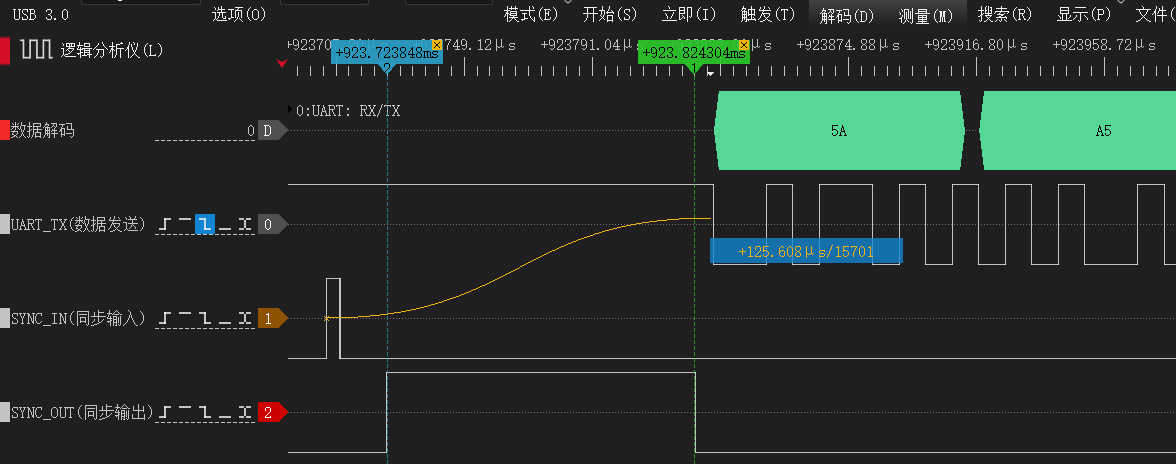
SYNC_IN Synchronous Data Trigger
Triggers data output via an external pulse. After the module detects a rising edge on the SYNC_IN/PPS pin, it outputs the data frame that has been configured for synchronous trigger mode; that frame is no longer sent periodically.
- Serial protocol: Use
LOG <MSG> ONMARK 1to configure the target frame as pulse-triggered (see "LOG Commands"). - J1939: Set the transmission period of the target PGN to
0x8000(see "J1939 Configuration Protocol").
When this function is not used, the pin is recommended to be left floating or grounded.
PPS Standard Pulse Synchronization
Using the SYNC_IN/PPS pin to receive an external 1PPS pulse, combined with receiving a time message over the serial port, can provide precise UTC time synchronization for delivery configurations with this function enabled. After the module detects a valid PPS rising edge and receives a matching time message, its internal clock automatically aligns to the UTC whole second.
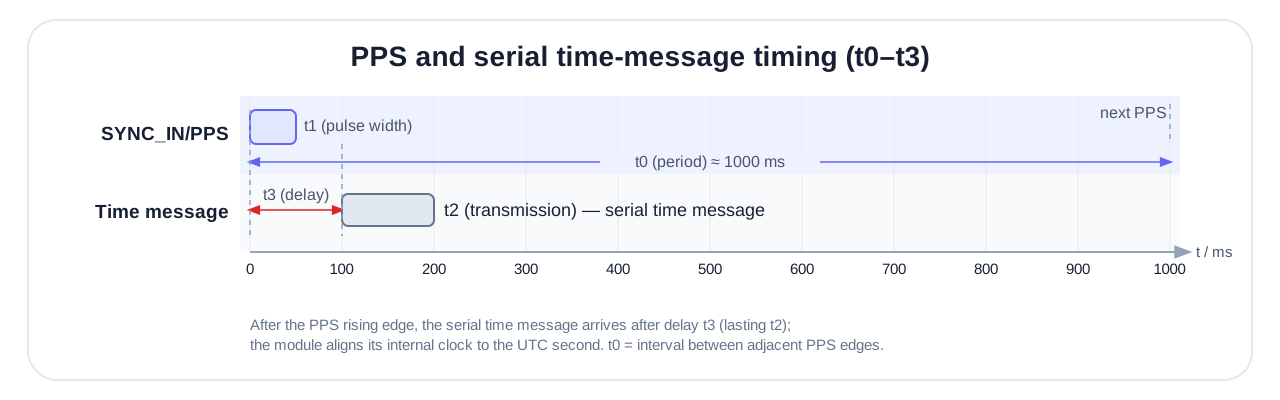
| Parameter | Description | Valid Range | Recommended |
|---|---|---|---|
| t0 | Interval between rising edges of adjacent pulses | 990~1010 ms | 1000 ms |
| t1 | Pulse high-level time (pulse width) | 1~100 ms | 10~50 ms |
| t2 | Time message transmission time | Related to baud rate | — |
| t3 | Delay of the time message relative to the most recent pulse rising edge | Within the firmware pairing window | 0~100 ms |
WARNING
Core requirement: The time message used for synchronization must carry the whole-second UTC time and arrive within the pairing window of the most recent PPS. In engineering practice, it is recommended to send it as close as possible to the PPS rising edge and to keep the phase stable.
Hardware and Interface Requirements:
SYNC_IN/PPS: Rising edge active; high level ≤ 5V (TTL/CMOS compatible).- Serial
RX: Time message frequency 1~10 Hz (1 Hz recommended); the baud rate must match the module's current configuration; only firmware-defined UTC time messages are supported.
The module extracts only the UTC time (hour/minute/second/millisecond) and date (year/month/day) fields from the time message for synchronization, ignoring all other fields. After successful synchronization, the meaning of system_time is described in "Time and Timestamps". This input message format is part of the delivery configuration; if PPS synchronization is required, refer to the delivery documentation of the corresponding product.
SOUT Synchronous Output
SOUT is the synchronous output pin. It is low when there is no data output; before a data frame begins transmitting, it first outputs a high pulse, and the data follows immediately after the falling edge of the pulse. It can be used to trigger devices such as cameras to achieve strict time synchronization. The SOUT_PULSE bit of the corresponding data frame's MAIN_STATUS (see "MAIN_STATUS Status Word") is set to 1.
Multi-function IO Multiplexing (PMUX)
The module provides multiple multi-function pins (IOx), each with a default multiplexed function, which can also be remapped via CONFIG PMUX<n> IO<m> (e.g., CONFIG PMUX2 IO3, see "CONFIG Configuration Commands"):
| Function | Name | Direction | Description | Default IO |
|---|---|---|---|---|
| PMUX1 | SYNC_IN/PPS | Input | Synchronous pulse input (see "Synchronization Function") | IO1 |
| PMUX2 | SOUT | Output | Pre-frame sync pulse output (see "SOUT Synchronous Output") | IO2 |
| PMUX3 | LED | Output | Operating status indicator | IO5 |
NOTE
Not all IO pins are brought out on a specific product; see the corresponding product hardware manual for details.
Product-Specific Features
The following features are supported only on specific models or delivery configurations; other models may skip this section.
Inclinometer Output (Only HI50 and Certain Models)
The inclinometer outputs the body's tilt relative to the horizontal plane in "inclination" semantics, suitable for scenarios such as platform leveling, angle monitoring, and construction machinery attitude. The inclination is derived from the attitude solution:
- X-axis inclination: Based on roll, with a range of ±180° dual-axis and a configurable 0–360° single-axis;
- Y-axis inclination: Based on pitch, with a range of ±90°.
Output locations: HI83 (bit9), Modbus (0x4A / 0x4B), J1939 (PGN 0xFF4A); see "Unified Data Dictionary" for the scale factor of each protocol. Inclination is always computed in Right-Front-Up and does not follow the output data axes.
Direction and zero point: The output direction of each axis can be independently reversed (0=default, 1=reversed; for J1939 configuration see "J1939 Configuration Protocol"); the inclination zero point is achieved via "attitude relative zeroing" (CONFIG ATT RST 2, see "CONFIG Configuration Commands"). After configuration, a reset or power cycle is recommended to recheck.
Wave Compensation / MRU Output (Heave / Surge / Sway)
The MRU delivery configuration is used to estimate the periodic motion of ships or offshore platforms, outputting three-axis displacement and main-frequency information:
| Motion Axis | Description | Output |
|---|---|---|
| Heave | Heave | Vertical displacement, frequency |
| Surge | Surge | Bow-stern direction displacement, frequency |
| Sway | Sway | Left-right direction displacement, frequency |
Surge and sway run along the vehicle's front-back and left-right directions and do not follow the output data axes. The data is output via HI83 (bit10 displacement / bit11 frequency) or Modbus (0x4E–0x50 displacement, 0x51–0x53 frequency); see "Unified Data Dictionary". The MRU output reflects the periodic-motion estimation result and is not used as absolute position or track information.
Application scenarios: Ship dynamic monitoring and attitude control, offshore engineering operation compensation (lifting, docking), wave characteristic research, and offshore platform attitude stability analysis.
Usage limitations:
WARNING
Important limitations:
- Applicable only to periodic reciprocating motion; the following cases usually cannot be accurately measured: motion with too long a period (> 30 s), unidirectional linear motion, and step-like displacement.
- Zero-mean assumption: The algorithm assumes that the long-term average of the displacement is 0.
- Initialization time: A stable 5~20 wave periods are required as the initialization time to obtain correct results.
- Frequency response range: The typical wave period is 3~20 s; accuracy decreases beyond this range.
Magnetic Calibration and Magnetic Environment
Magnetic calibration removes the hard-iron/soft-iron disturbances that move together with the module, and is a prerequisite for obtaining a reliable heading angle in 9-axis (AHRS / magnetometer-aided absolute heading) mode. Magnetic calibration is not required when using 6-axis (VRU) mode only.
NOTE
Procedure overview: Switch to 9-axis mode, save and restart → check the magnetic environment → start calibration and slowly rotate each axis together with the carrier → query calibration status → rotate one full turn to verify heading.
Applicable Scenarios
9-axis mode is recommended when all of the following conditions are met simultaneously:
- Complete at least one user magnetic calibration before using 9-axis mode for the first time;
- The operating environment has no obvious spatial magnetic distortion (an open outdoor area is recommended; an indoor environment with a complex magnetic field makes good results hard to guarantee);
- The relative position between the module and its mounting carrier (PCB, enclosure, robot, etc.) stays fixed during use.
WARNING
Prefer 6-axis indoors: Indoor spatial magnetic distortion cannot be removed by calibration; even if calibration succeeds, the 9-axis heading accuracy may still be worse than in 6-axis mode. For scenarios such as equipment rooms, laboratories, workshops, and underground garages, 6-axis mode is recommended.
Run-time trustworthiness assessment:
MAG_AIDING indicates whether magnetometer-aided mode is enabled; it cannot establish heading reliability by itself. Evaluate MAG_DIST, ATT_CONV and actual heading changes together. See "MAIN_STATUS Status Word" for the bit definitions.
Calibration Steps
The following procedure uses ASCII commands. For Modbus, substitute the corresponding magnetic calibration register operations; environment checks, rotation, status meanings and result verification use this same procedure.
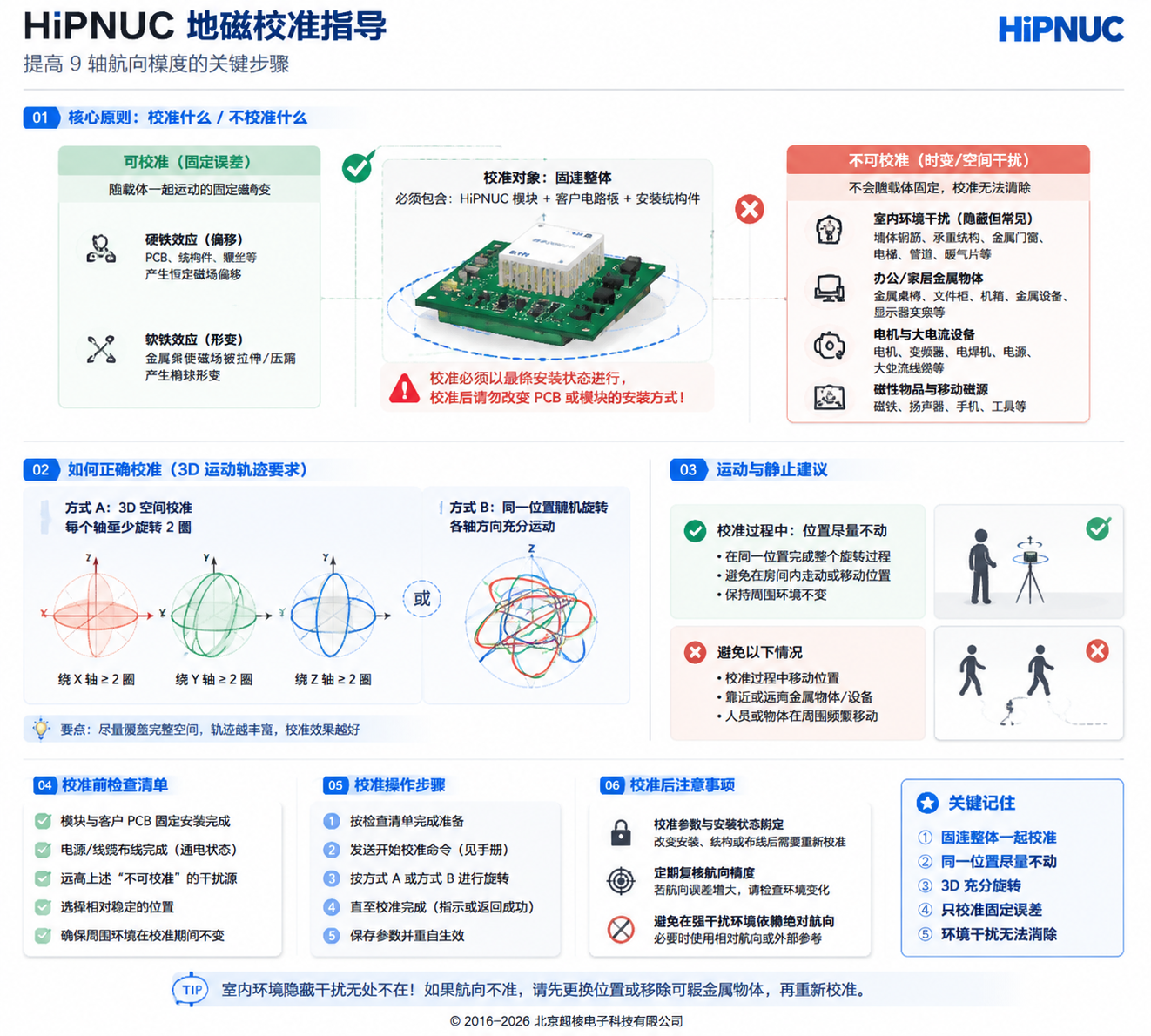
Step 1: Switch the operating mode
First configure the module to 9-axis mode (CONFIG ATT MODE 1, see "Operating Mode"), run SAVECONFIG, then reset or power-cycle. Confirm that magnetometer-aided mode is enabled via MAIN_STATUS.MAG_AIDING=1 or configuration readback.
Step 2: Check the calibration environment
Common sources of magnetic interference: magnets, speakers, magnetic screws, iron furniture, steel fixtures, vehicle chassis, computer monitors, motors and transformers, high-current cables, mobile phone chargers, structural building rebar, etc.
| Environment level | Requirement |
|---|---|
| Best | Open outdoor area, away from buildings and vehicles (distance > 5 m) |
| For temporary verification only | An indoor area away from steel structures, motors, high-current cables, and magnets; mass-production acceptance should use an open outdoor area, or a fixed site already validated by B_total and heading-rotation verification |
WARNING
Whole-assembly calibration principle: If the module has already been soldered onto the product PCB, uses a magnetic enclosure, or has already been installed on a robot/mechanical equipment, you must rotate and calibrate the entire assembly that is rigidly fixed to the module together. Calibrating the module alone and then installing it into the product will invalidate the calibration.
Step 3: Perform the calibration
Send the calibration command: CONFIG MCAL START (requires firmware version ≥ 1.7.0). Once the module enters the calibration process, it collects three-axis magnetic field samples during rotation and automatically fits the hard-iron/soft-iron compensation parameters; no stop command needs to be sent.
Rotation essentials:
- Keep the position essentially unchanged within as small a spatial range as possible, and slowly rotate only the module; if the module is already rigidly fixed to the carrier, rotate the module and carrier together as a whole;
- Cover as many attitude directions as possible; for 3D calibration it is recommended to rotate each axis at least 360° (2 to 3 turns recommended), at a uniform speed, with a recommended 20 to 100 deg/s (about 4 to 18 seconds per turn), avoiding staying in the same attitude for a long time;
- Initially allow 30 to 60 s of rotation, checking calibration status during the process.
Recommended rotation scheme: rotate 2 turns about the X axis → 2 turns about the Y axis → 2 turns about the Z axis; or rotate randomly, ensuring every axis undergoes sufficient angular variation while keeping the position as fixed as possible.
Speed, duration and number of turns are operating guidelines only; calibration is complete when STAT=3.
NOTE
Planar mounting (2D) calibration: For mountings that stay essentially level during operation and rotate mainly about the vertical axis (such as AGVs, turntables, vehicles), planar calibration can be started via the command line CONFIG MCAL START 2D, requiring rotation only about the vertical axis. In CHCenter, the "Magnetic Calibration" window offers "3D — Handheld / Drone" and "2D — Vehicle / AGV" and shows the matching rotation guidance. 2D calibration is not detected automatically and must explicitly carry the 2D parameter; it updates only the horizontal-plane parameters and retains the existing Z-axis hard-iron compensation. If a valid 3D calibration has never been performed, the Z-axis hard-iron environment changes, or the carrier will pitch/roll noticeably, use 3D calibration.
Step 4: Query the calibration status
Send LOG MCAL STAT. Example response:
STAT=3
PROGRESS=100
OK| STAT | Status | Recommended action |
|---|---|---|
| 0 | Currently idle | A new calibration can be started |
| 1 | Calibrating | Continue rotating the module; if the module is already rigidly fixed to the carrier, rotate the module and carrier together as a whole |
| 3 | Calibration completed | Verify heading using Step 5 |
| 4 | Calibration failed | Refer to the troubleshooting procedure and recalibrate |
PROGRESS: ranges 0 to 100, indicating magnetic-sample coverage, not time progress; it shows at most 99 while running and only shows 100 after STAT=3.
After calibration succeeds, the hard-iron/soft-iron compensation parameters are immediately applied to the AHRS estimation and written to non-volatile storage; there is no need to run SAVECONFIG separately, nor is a reset required for them to take effect. It is recommended to perform another heading-rotation verification after reset or power-cycle to confirm that the parameters retained through power-down still suit the current mounting and environment.
Step 5: Verify the calibration result
- After calibration is complete, place the module level and slowly rotate it one full turn (360°);
- Observe the heading angle output: ideally it should vary continuously with the rotation, without unexpected jumps; if the protocol output range is ±180°, wrap-around at the ±180° boundary is allowed; if the output range is 0° to 360°, wrap-around at the 0/360° boundary is allowed;
- If the error relative to the reference heading or the closure error over one full turn exceeds ±5°, a non-boundary wrap-around jump appears, or the heading angle does not change with rotation, refer to the troubleshooting procedure below.
Troubleshooting Procedure
When calibration fails (STAT=4) or the verification result is abnormal, check item by item according to the table below, moving to the next item only after the previous one passes (total magnetic field strength B_total = √(Bx² + By² + Bz²), computed from the mag_b three axes):
| Order | Check item | Pass criterion | Handling when failed |
|---|---|---|---|
| 1 | Read the total magnetic field strength B_total at rest | 20–60 μT | Below 20 μT (shielded / too weak) or above 60 μT (a magnet nearby / too strong) → move away from the interference source or change location, then recalibrate |
| 2 | Whether attitude coverage is sufficient | 3D: sufficient coverage on each axis, recommended ≥ 360° per axis; 2D: more than one full turn around the vertical axis in the horizontal plane; rotation speed recommended 20–100 deg/s | Insufficient coverage or staying in the same attitude for a long time → redo the rotation per the essentials, then recalibrate |
| 3 | Change of B_total when changing orientation at the same location | Difference between maximum and minimum ≤ 10 μT | Exceeds 10 μT (spatial magnetic distortion present); do not judge by the variation of a single axis Bx/By/Bz → change location, or switch to 6-axis mode |
| — | All three items pass but still abnormal | — | Perform calibration again in a clean environment |
Frequently Asked Questions
| Failure cause | Typical symptom | Solution |
|---|---|---|
| Excessive ambient magnetic interference | STAT=4 or heading-angle jumps | Move to an open outdoor area to calibrate |
| Non-standard rotation motion | PROGRESS grows slowly or stalls | Ensure each axis is rotated sufficiently at a uniform speed |
| Position moved during rotation | Calibration completes but accuracy is poor | Keep the position fixed during calibration and rotate the attitude only |
| Module-carrier position changed | Heading-angle error increases after reinstallation | Recalibrate the module and carrier together as a whole |
Precautions
WARNING
Indoor magnetic field limitation: Indoor spatial magnetic interference cannot be removed by calibration, and the 9-axis heading accuracy depends on the actual degree of magnetic distortion; for the principle, see "Magnetic Interference Types and Calibration Boundaries" in this chapter.
WARNING
Fixed-mounting requirement: Sources of magnetic interference must keep a fixed relative position to the module. When the module is mounted on a magnetically permeable rigid body (robot/mechanical equipment/vehicle/ship/tripod/PCB, etc.), the entire system must be rotated and calibrated together; no relative displacement should occur during use, and recalibration is required once they are separated.
WARNING
Motor and current influence: If the magnetic field produced by motors, cables, and drivers varies with load, current, or speed, it is a time-varying disturbance and cannot be removed by a single magnetic calibration. Calibration is recommended while the motor is stopped; only when the operating state is stable and the magnetic field is fixed relative to the module may calibration be done in that operating state. If the operating state changes significantly, increase the distance or use 6-axis mode.
Calibration Frequency and Mode Selection
Calibration frequency recommendations:
- Calibrate and verify heading after initial fixed installation; repeated calibration is normally unnecessary if the mounting is unchanged and verification remains normal.
- Recalibrate after changing the module's position relative to the carrier, or magnetic components that move with the module.
- After changing environment or observing abnormal heading, first check magnetic interference and mounting. If problems remain after removing interference, recalibrate in a suitable environment.
Mode selection recommendations:
| Application scenario | Recommended mode | Reason |
|---|---|---|
| Open outdoor environment (UAVs, etc.) | 9-axis | Low magnetic interference; an absolute heading angle can be obtained |
| Indoor environment (AGVs, robots, etc.) | 6-axis | Indoor magnetic interference is large; 6-axis is more stable |
| Near motors / electromagnetic equipment | 6-axis | Electromagnetic interference cannot be removed by calibration |
| Absolute heading angle required | 9-axis | Must ensure a stable ambient magnetic field and a completed calibration |
| Only relative heading angle required | 6-axis | The 6-axis heading angle is 0 at power-up, suitable for relative measurement |
Magnetic Interference Types and Calibration Boundaries
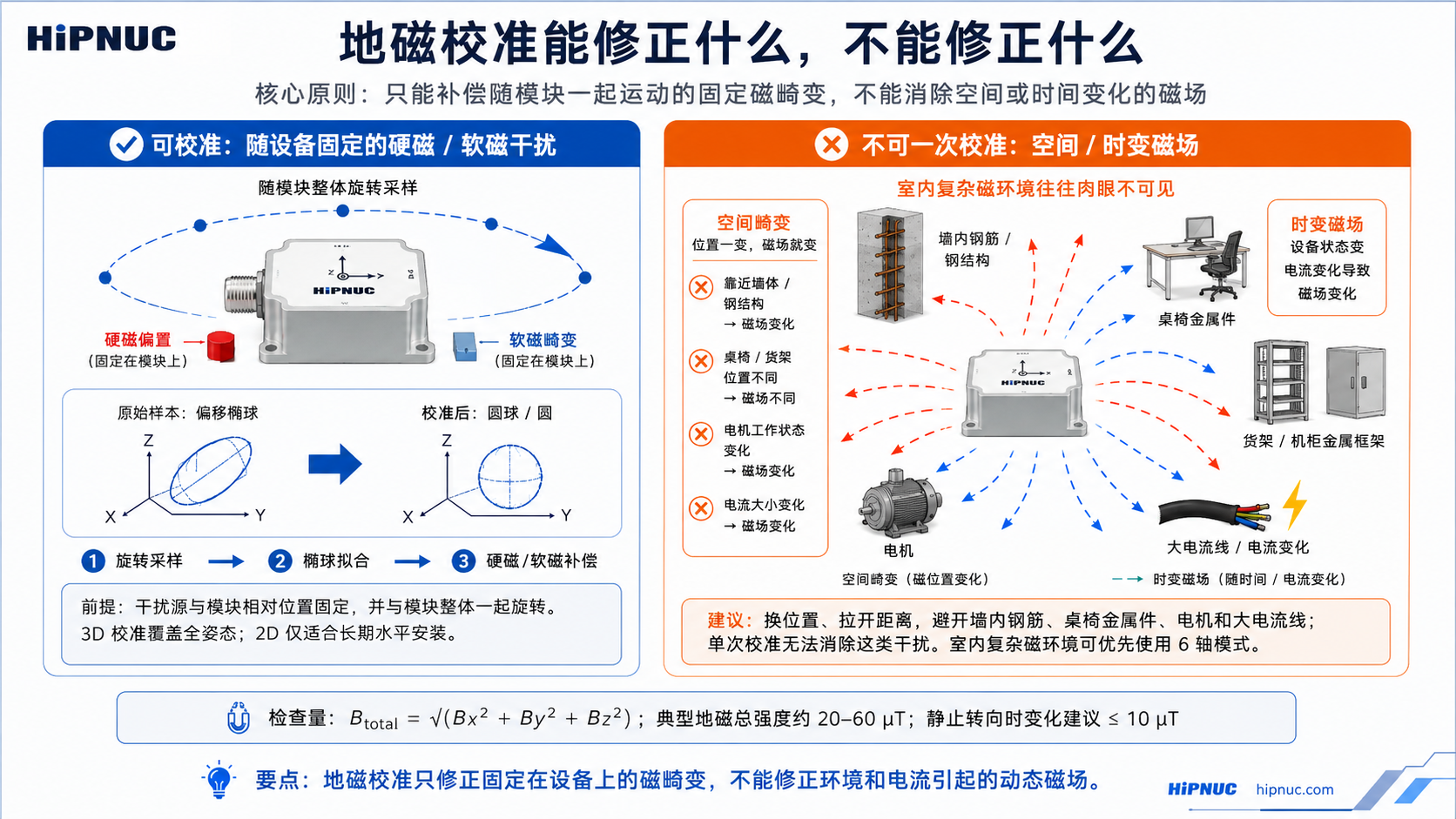
Magnetic interference can be divided into two major categories by "whether it moves together with the sensor". Only interference that moves with the sensor can be removed by user magnetic calibration; spatial magnetic distortion cannot be removed no matter how you calibrate.
| Magnetic interference type | Interference moving with the sensor | Spatial magnetic distortion |
|---|---|---|
| Characteristics | The interference source moves as the sensor moves | The interference source does not move with the sensor |
| Sub-categories | Hard-iron (rigidly attached magnets / PCB / metal enclosure), soft-iron (rigidly attached permeable metal), sensor calibration error | Spatial distortion (rebar / furniture / appliances), temporal distortion (motor / current variation) |
| Typical interference sources | PCB rigidly fixed to the module, metal enclosure, UAV frame, etc. | Furniture, household appliances, cables, building rebar structures, etc. |
| Can it be calibrated | Yes | Impossible |
| Mitigation measures | Can be removed by user magnetic calibration | Calibration cannot remove it and it significantly increases heading-angle error |
ASCII Command Reference
Module configuration uses serial ASCII string commands, each terminated by a carriage-return/line-feed \r\n (similar to AT commands). This chapter is the authoritative syntax reference for the commands; for functional background and operating procedures, see "Product Features and Configuration".
Command Format and Conventions
- Case: command keywords are uppercase.
- Separation: parameters are separated by spaces, e.g.
CONFIG IMU URFR 24(notURFR=24). - Effect and saving:
- Communication commands (
SERIALCONFIG,LOG ENABLE/DISABLE,LOG <MSG> ONTIME/ONMARK) usually take effect immediately; - Some settings are loaded only after a reset or power cycle; refer to each command's description and the appendix "Factory Default Configuration";
- Restore-type commands (
FRESET) save automatically and trigger a reset.
- Communication commands (
- Configuration procedure: see Configuration and Saving.
NOTE
This chapter lists common public commands. Compatibility or custom commands are governed by the actual delivery documentation.
Command Overview
| Command | Function | Effect |
|---|---|---|
REBOOT | Reset the module | Immediate |
SAVECONFIG | Save configuration | Immediate |
SERIALCONFIG | Set the serial baud rate | Immediate |
FRESET | Restore factory defaults | Immediate (saves automatically and resets) |
CONFIG | Configure various parameters and operating modes | Per sub-command |
LOG | Query information / configure data output | Per sub-command |
System Commands
REBOOT — Reset the module. Example: REBOOT
SAVECONFIG — Save configuration. Run this command once after configuration for compatibility across firmware versions.
Example: SAVECONFIG
SERIALCONFIG — Set the serial baud rate. Format: SERIALCONFIG [<COM>] <BAUD>
- When
<COM>is omitted, the currently connected serial port is configured; when specified (e.g.COM2), the corresponding serial port is configured. - Supported
BAUDvalues (9 in total):48009600192003840057600115200230400460800921600
Examples: SERIALCONFIG 115200, SERIALCONFIG COM2 921600
WARNING
This command takes effect immediately; after changing the connected port, switch the host baud rate as well. See ASCII Serial Baud Rate for the full procedure and verification.
FRESET — Restore default user configuration; after execution it saves automatically and resets, so use it with caution. Example: FRESET
CONFIG Configuration Commands
NOTE
The effect timing of CONFIG varies. Run SAVECONFIG after configuration; for settings that require a restart, read back after restarting. Public configuration can be queried with LOG COMCONFIG, LOG USRCONFIG, and LOG MCAL STAT (see "LOG Commands").
ATT RST and MCAL act immediately; ATT MODE, IMU COORD, IMU URFR and PMUX are loaded after a reset or power cycle.
Operating Mode — CONFIG ATT MODE <VAL>
| VAL | Mode |
|---|---|
| 0 | VRU (6-axis) |
| 1 | AHRS (9-axis, magnetometer-aided) |
| 4 | Dedicated to humanoid robots |
| 5 | Low-speed ground platform (lawn mowers / agricultural machinery / construction machinery, etc.) |
| 7 | Low-dynamic / inclinometer |
Other delivered modes are governed by the corresponding product documentation. For background, see "Operating Mode".
Attitude Calibration — CONFIG ATT RST <VAL>
The device should be stationary during execution; otherwise errors are introduced.
| VAL | Action | Retained after power-off |
|---|---|---|
| 0 | Zero all: set the current roll / pitch / yaw to zero; how the heading is saved is described below | Yes |
| 1 | Heading reset: set the current heading to zero | No, cleared on restart |
| 2 | Set relative zero: set the current pitch / roll to zero, heading unchanged | Yes |
| 3 | Auto-leveling: only when pitch and roll are both within ±5°, level both to 0°; otherwise not executed and ERR is returned | Yes |
| 5 | Cancel leveling: clear the saved zero and restore the module's original attitude output | Yes |
Check the attitude output after execution to confirm the result. After RST 0, RST 2, a successful RST 3, or RST 5, follow Configuration and Saving. RST 2 suits a fixed mounting tilt between module and vehicle and also sets the inclinometer zero; RST 3 suits a module that is already nearly level with only a small residual offset. Modbus register 0xA5 and J1939 address 0x00A5 take the same values.
- The zero is tied to the mounting orientation: it is recorded in the vehicle's right, front and up axes, together with the mounting orientation in force when it was saved. After
URFRis changed and the module restarts, the old zero no longer applies (it applies again if the mounting orientation is changed back; clear it withRST 5if unwanted); changing the output data axes does not affect it. In 9-axis modeRST 0saves the heading zero in the output data axes in force at the time, so switching the output data axes afterwards changes the heading read at the same orientation: for example, zero under ROS, switch back to Right-Front-Up, and the heading reads −90°. - Heading with
RST 0: in 9-axis mode the heading is saved together with the leveling; in 6-axis and other relative-heading modes only the leveling is saved, and the heading is zeroed for the current power cycle only; the next power-up still starts from 0. - Switching from 9-axis to 6-axis: after
RST 0in 9-axis mode, a switch to 6-axis carries the saved heading offset into the power-up heading, which no longer starts at 0 (for example −90° under ROS). SendCONFIG ATT RST 5to clear the zero, then level again in 6-axis mode if needed (RST 2orRST 3).
NOTE
Other values are reserved and are not part of the public interface.
Mounting Orientation — CONFIG IMU URFR <CODE>
CODE is a 2–3 digit code declaring where the printed X/Y/Z arrows point on the vehicle; it takes effect after a reset or power cycle. For the complete code table (24 legal right-handed frames), see Mounting Orientation. Example: CONFIG IMU URFR 24 (default horizontal mounting)
Output Data Axes — CONFIG IMU COORD <VAL>
| VAL | Output data axes |
|---|---|
| 0 | Right-Front-Up (default) |
| 4 | ROS (REP-103): Front-Left-Up |
Takes effect after a reset or power cycle; see Output Data Axes.
Multi-function IO Multiplexing — CONFIG PMUX<n> IO<m>
n=1~3 is the multiplexed function, and m=1~5 is the target pin. For function definitions, see "Multi-function IO Multiplexing". Example: CONFIG PMUX2 IO1 (set IO1 as synchronous output)
Magnetic Calibration — CONFIG MCAL START [2D]
Start a manual magnetic calibration. Without the 2D parameter it is a 3D calibration; CONFIG MCAL START 2D is a planar (rotation about the vertical axis only) calibration. For status queries, see LOG MCAL STAT. For the complete procedure, see "Magnetic Calibration and Magnetic Environment".
User-level Gyro Calibration — CONFIG USRCAL START <ANGLE> / CONFIG USRCAL STOP
ANGLE: calibration angle, in degrees, with a valid range of 360°~3600°; out-of-range values return an error.- After the rotation is complete, send
CONFIG USRCAL STOP; on success it returnsOK, otherwise it returnsERR(usually indicating that the main rotation axis is ambiguous or that the scale factor is outside the allowed range). - Example:
CONFIG USRCAL START 720→ rotate 2 turns →CONFIG USRCAL STOP. For the complete operating steps and failure troubleshooting, see "Attitude Calibration".
WARNING
USRCAL is a precision calibration process. If you set a rotation of 720° but actually rotate 725°, the scale factor will be mis-calibrated by about 0.7%, which instead introduces additional heading error and degrades long-term accuracy. Use it only when a reliable angle reference is available.
LOG Commands
Data Output Switch
LOG ENABLE— enable data frame output on the current serial port.LOG DISABLE— disable data frame output on the current serial port.
Set Data Frame Output Type and Rate — LOG [<COM>] <MSG> <TYPE> <VALUE>
COM(optional): the target serial port, e.g.COM2; when omitted, the currently connected serial port is configured.MSG: the data frame type, commonlyHI91,HI83, etc. (governed by the product and serial port configuration).TYPE:ONTIME(timed) orONMARK(pulse / software triggered).VALUE:TYPE=ONTIME: output period, in s, range0.001(1 kHz) ~1(1 Hz);0disables timed output;TYPE=ONMARK:1triggers on a SYNC_IN/PPS pulse;ONCEtriggers once manually.
Examples:
LOG HI91 ONTIME 0.01— HI91 output at 100 Hz (current serial port)LOG COM2 HI91 ONTIME 0.01— output HI91 at 100 Hz on COM2LOG HI91 ONTIME 0— disable HI91 outputLOG HI91 ONMARK 1— configure HI91 to trigger on a SYNC_IN/PPS pulseLOG HI91 ONMARK ONCE— trigger one output from software; HI91 must already be configured forONMARKmode.
ONCE may also trigger other frames configured for ONMARK on the same serial port. After a temporary change, restore the original output mode and period, then save according to the configuration procedure.
WARNING
At high frame rates (e.g. 500 Hz), the default 115200 baud rate may be insufficient; please raise the baud rate (e.g. 921600). For bandwidth estimation, see the appendix "Output Bandwidth and Baud Rate".
HI83 Field Configuration — LOG HI83 MAP <BITMAP>
BITMAP is hexadecimal or decimal, and each bit corresponds to one data segment (bit definitions are in "Variable-type Data Frame (HI83)"). The default is 0x000000FF.
The HI83 fields defined in this manual are bit0-bit11 (field mask: 0x00000FFF). Other bits are not defined in this manual and should not be set by the user; MRU wave compensation uses bit10/bit11.
| Command | Description |
|---|---|
LOG HI83 MAP 0x000000FF | Default combination: acceleration / angular rate / magnetic field / Euler angles / quaternion / system time / UTC / air pressure |
LOG HI83 MAP 0x0000001F | IMU + attitude basics: acceleration / angular rate / magnetic field / Euler angles / quaternion |
NOTE
MAP selects HI83 output fields and is shared by all serial ports; output enable and rate are set by LOG HI83 ONTIME <period>. After changing it, run SAVECONFIG, restart the device, then confirm the returned MAP with LOG COMCONFIG. The receiver must parse each frame using its data_bitmap.
Query Sub-commands
| Command | Output Content |
|---|---|
LOG VERSION | PNAME, BUILD, UUID, SN, APP_VER, BL_VER |
LOG COMCONFIG | Current serial port configuration: baud rate, ONTIME / ONMARK settings of each data frame, HI83 MAP |
LOG USRCONFIG | User configuration: operating mode (PROFILE), mounting orientation (URFR), output data axes (COORD) |
LOG MCAL STAT | Magnetic calibration status: STAT, PROGRESS |
ONTIME returned by LOG COMCONFIG is in ms, whereas the setting command uses s. For example, ONTIME=20 means 20 ms, corresponding to LOG HI91 ONTIME 0.02.
Command Responses and Error Codes
After an ASCII command executes, the result is returned through the same serial port. Success usually echoes OK (or the corresponding query content), while failure returns a message starting with ERROR / ERR. Summary of common responses:
| Source | Response | Meaning |
|---|---|---|
| General configuration | OK | Command accepted |
SERIALCONFIG | ERROR: Unsupported baud | Baud rate is not among the 9 supported values |
CONFIG USRCAL STOP | OK / ERR | Gyro calibration succeeded / verification failed (see "CONFIG Configuration Commands") |
LOG MCAL STAT | STAT=4 | Magnetic calibration failed (for troubleshooting, see "Magnetic Calibration and Magnetic Environment") |
Unified Data Dictionary
The module supports multiple data output protocols, covering different physical interfaces and upper-layer buses:
| Protocol | Physical Interface | Characteristics | See |
|---|---|---|---|
| HiPNUC binary (HI91 / HI83) | RS-232 / TTL / USB | Factory default; HI91 fixed-length, HI83 bitmap-configurable | "Serial Binary Protocol" |
| Modbus RTU | RS-485 | Industrial standard, register read/write | "Modbus RTU Protocol" |
| J1939 | CAN 2.0B | Recommended for new CAN integrations; periodic PGN broadcast | "CAN Protocol" J1939 |
| CANFD83 | CAN FD | Manufacturer PGN 0xFF5B, MAP-selectable fields | CANFD83 variable frame |
| CANopen | CAN 2.0B | Existing integrations only; availability depends on the delivered model and firmware | CANopen |
This chapter is a cross-protocol data reference. Shared definitions are in Basic Conventions; the corresponding protocol chapter is authoritative for frame formats, fields, register addresses, units and scale factors.
Parameters can be configured through ASCII commands or the bus configuration interfaces supported by the product. See ASCII Command Reference, Modbus RTU Protocol and the J1939 Configuration Protocol for operations and scope.
The J1939 column in the following tables refers to classic CAN data PGNs, not CANFD83. CANFD83 acceleration and angular rate are floating-point values in m/s² and rad/s. See the CANFD83 field table for coverage, lengths and units; do not apply classic CAN fixed-point scale factors.
WARNING
Cross-protocol unit differences: The same physical quantity may have different data types, scale factors, and units across protocols. This is an existing fact of the firmware (not a typo). Decode strictly according to the column for the protocol you are using, and never apply a scale factor across protocols. The scale-factor convention is given in "Data Types, Byte Order, and Scale Factors": physical value = raw value × scale factor.
Decoding Pitfalls at a Glance
The table below lists only items that are easily confused across protocols; for precise item-by-item decoding (address / type / scale / unit), see the register/field table in the protocol chapter you are using.
| Physical Quantity | Cross-protocol Pitfall | Consequence of Misapplication |
|---|---|---|
| Acceleration | 4 decodings: HI91 = G (f32), HI83 = m/s² (f32), Modbus / J1939 = i16 ×0.00048828 → G (±16 G), CANopen = mG (×0.001 G) | Dimension off by 9.8× (G ↔ m/s²) or 1000× (G ↔ mG) |
| Heading yaw | Dual representation in one frame: J1939 carries both u32 = CW 0–360 (compass heading, always Right-Front-Up) and i32 = ±180 in the same frame; HI91 / HI83 / Modbus / CANopen are all CCW/raw | Wrong field → direction and sign fully reversed |
| System time | HI91 time semantics change with the UTC synchronization state; time fields are not directly interchangeable between protocols — see Time and Timestamps and each protocol's field table. CANopen does not output it | Subtracting after a unit conversion alone can give a wrong time difference |
| Inclination | 4 encodings: HI83 = f32 deg, Modbus = i16 ×0.011 deg, J1939 = i32 ×0.001 deg, CANopen = i32 ×0.01 deg; HI91 does not output it | Wrong scale / type → wrong value |
| Angular rate | Varied units / scales: HI91 = deg/s (f32), HI83 = rad/s (f32, off by 57.3×), Modbus / J1939 = i16 ×0.061 → deg/s, CANopen = i16 ×0.1 deg/s (coarser) | Dimension off by 57.3× (deg/s ↔ rad/s) or wrong scale |
Output Coverage Overview
✓ = the protocol outputs this quantity; — = not output. For exact address / scale / unit, see the register/field table in the protocol chapter you are using.
| Physical Quantity | HI91 | HI83 | Modbus | J1939 | CANopen |
|---|---|---|---|---|---|
| Acceleration | ✓ | ✓ | ✓ | ✓ | ✓ |
| Angular rate | ✓ | ✓ | ✓ | ✓ | ✓ |
| Magnetic field | ✓ | ✓ | ✓ | ✓ | — |
| Roll / Pitch | ✓ | ✓ | ✓ | ✓ | ✓ |
| Heading yaw | ✓ | ✓ | ✓ | ✓ | ✓ |
| Quaternion | ✓ | ✓ | ✓ | ✓ | ✓ |
| Temperature | ✓ | ✓ | ✓ | ✓ | — |
| Air pressure | ✓ | ✓ | ✓ | — | ✓ |
| System time | ✓ | ✓ | ✓ | ✓ | — |
| Inclination | — | ✓ | ✓ | ✓ | ✓ |
| Heave / Surge / Sway | — | ✓ | ✓ | — | — |
Serial Binary Protocol
RS-232, serial TTL, and USB (virtual COM port) are all streaming serial interfaces, and all output using HiPNUC's proprietary binary protocol. This protocol is the module's factory default output protocol. The serial parameters are 8 data bits, no parity, 1 stop bit (8N1), with a factory default baud rate of 115200 bps (see the appendix "Factory Default Configuration").
Frame Format
| Field | Value | Length (bytes) | Description |
|---|---|---|---|
| SOF | 5A A5 | 2 | Start-of-frame sync word |
| LEN | 1–512 | 2 | Payload length (little-endian, excluding SOF/length/CRC) |
| CRC | — | 2 | 16-bit CRC over SOF, length, and payload (excluding the CRC field itself) |
| Payload | — | 1–512 | Composed of several sub-packets; each sub-packet consists of a tag and data, where the tag determines its type and length |
WARNING
Frame Length Limit: The payload is at most 512 bytes (a full frame is at most 518 bytes). The decoder rejects any payload exceeding 512 bytes outright. When all public HI83 fields defined in this manual are enabled, the payload totals 132 bytes, still within the limit.
WARNING
Byte Order: All multi-byte values are little-endian (low byte first). See "Data Types, Byte Order, and Scale Factors" for details.
Factory default output: floating-point IMU data frame (HI91).
Floating-Point IMU Data Frame (HI91)
The payload totals 76 bytes and contains module status, temperature, IMU measurements (acceleration, angular rate and magnetic field), air pressure and fused attitude. IMU measurements are not raw chip-register readings; measurements and attitude are expressed in the output data axes.
| Offset | Name | Type | Size | Unit | Description |
|---|---|---|---|---|---|
| 0 | tag | uint8 | 1 | — | Data tag: 0x91 |
| 1 | main_status | uint16 | 2 | — | Status word, see "MAIN_STATUS Status Word" |
| 3 | temperature | int8 | 1 | °C | Module average temperature |
| 4 | air_pressure | float | 4 | Pa | Air pressure |
| 8 | system_time | uint32 | 4 | ms | Timestamp, see "Time and Timestamps" |
| 12 | acc_b | float | 4×3 | G | Acceleration, order XYZ; 1 G ≈ 9.8 m/s² |
| 24 | gyr_b | float | 4×3 | deg/s | Angular rate, order XYZ |
| 36 | mag_b | float | 4×3 | μT | Magnetic field strength, order XYZ |
| 48 | roll | float | 4 | deg | Roll angle |
| 52 | pitch | float | 4 | deg | Pitch angle |
| 56 | yaw | float | 4 | deg | Heading angle |
| 60 | quat | float | 4×4 | — | Quaternion, order WXYZ |
WARNING
Unit Difference: In HI91 the angular rate unit is deg/s; in HI83 the gyr_b unit is rad/s (a factor of 57.3 between them). Select the correct unit according to the frame type you are parsing.
Variable-Type Data Frame (HI83)
HI83 is a configurable variable-length frame that outputs different data combinations according to data_bitmap, with the frame length changing with the configuration. It suits scenarios where IMU, attitude, time, and other data need to be output simultaneously while controlling bandwidth on demand.
A fixed header (8 bytes) is immediately followed by the data segments selected by data_bitmap. The arrangement order of the data segments is given in "Data Segment Arrangement and Offset Calculation" below; the parser must accumulate offsets in that order and must not infer them from the bit value alone.
| Offset | Name | Type | Size | Description |
|---|---|---|---|---|
| 0 | tag | uint8 | 1 | Data tag: 0x83 |
| 1 | main_status | uint16 | 2 | Status word, see "MAIN_STATUS Status Word" |
| 3 | status_ext | uint8 | 1 | Status extension byte; this manual does not define the meaning of its bits, and a generic parser may ignore it |
| 4 | data_bitmap | uint32 | 4 | Data bitmap; each bit corresponds to one data segment |
| 8 | … | — | Variable | Data segments arranged in the line order below |
data_bitmap bit definitions (for configuration, see the HI83 field configuration in "LOG Commands"). The table below is the public IMU/AHRS/MRU field dictionary; when a product does not enable the corresponding feature, a field may be 0 or have no valid physical meaning:
| Bit | Name | Type | Size | Unit | Description |
|---|---|---|---|---|---|
| 0 | acc_b | float | 4×3 | m/s² | Body-frame acceleration, order XYZ |
| 1 | gyr_b | float | 4×3 | rad/s | Body-frame angular rate, order XYZ |
| 2 | mag_b | float | 4×3 | μT | Body-frame magnetic field, order XYZ |
| 3 | rpy | float | 4×3 | deg | Euler angles: roll −180~180, pitch −90~90, heading −180~180 (counterclockwise positive) |
| 4 | quat | float | 4×4 | — | Quaternion, order WXYZ |
| 5 | system_time_us | uint64 | 8 | μs | Local high-resolution timestamp (microseconds accumulated since power-on, unaffected by time synchronization) |
| 6 | utc | — | 8 | — | UTC time: year offset (1, year-2000, e.g. 24=2024), month (1), day (1), hour (1), minute (1), second (2, unit ms, e.g. 12 s = 12000), reserved (1) |
| 7 | air_pressure | float | 4 | Pa | Air pressure |
| 8 | temperature | float | 4 | °C | Module average temperature |
| 9 | inclination | float | 4×3 | deg | Inclinometer output, order inclination_x / inclination_y / yaw; the third float is the Right-Front-Up yaw (counter-clockwise, ±180°), neither the Z-axis inclination nor the compass heading; none of the three follows the output data axes |
| 10 | heave_surge_sway | float | 4×3 | m | MRU displacement: heave, surge, sway |
| 11 | heave_surge_sway_frq | float | 4×3 | Hz | MRU frequency: heave, surge, sway |
| 12–31 | Extension | — | — | — | Delivery-specific extension fields, not defined in this manual; generic users should not set these bits |
NOTE
Data Segment Arrangement and Offset Calculation: The public HI83 fields defined in this manual are concatenated in the order bit0–bit11, with the public field mask being 0x00000FFF. Bit12 and above may enable undocumented extension fields, which generic users should not set; do not use an all-enabled configuration such as 0xFFFFFFFF, otherwise the frame length and field semantics cannot be parsed from this manual alone. Unset fields do not appear, and the whole frame shortens accordingly; when parsing, accumulate the offset item by item according to the field sizes in the table.
CRC Check
CRC-16/XMODEM is used (also labeled CRC-16/CCITT in some tools): polynomial 0x1021, initial value 0x0000, no input/output reflection, no final XOR. The check covers SOF (2) + length (2) + payload, excluding the CRC field itself.
/*
    currentCrc: previous crc value, set 0 if it's the first section
    src: source stream data
    lengthInBytes: length
*/
static void crc16_update(uint16_t *currentCrc, const uint8_t *src, uint32_t lengthInBytes)
{
    uint32_t crc = *currentCrc;
    for (uint32_t j = 0; j < lengthInBytes; ++j)
    {
        crc ^= (uint32_t)src[j] << 8;
        for (uint32_t i = 0; i < 8; ++i)
        {
            uint32_t temp = crc << 1;
            if (crc & 0x8000)
                temp ^= 0x1021;
            crc = temp;
        }
    }
    *currentCrc = crc;
}
Frame Parsing Example (HI91)
A HI91 frame is 82 bytes in total: the first 6 bytes are SOF/length/CRC, followed by 76 bytes of payload. The example was captured with the default output data axes (COORD 0). Example frame (received into array buf):
5A A5 4C 00 14 BB 91 08 15 23 09 A2 C4 47 08 15 1C 00 CC E8 61 BE 9A 35 56 3E 65 EA 72 3F 31 D0 7C BD 75 DD C5 BB 6B D7 24 BC 89 88 FC 40 01 00 6A 41 AB 2A 70 C2 96 D4 50 41 ED 03 43 41 41 F4 F4 C2 CC CA F8 BE 73 6A 19 BE F0 00 1C 3D 8D 37 5C 3F| Field | Type | Raw Value | Parsed Value | Description |
|---|---|---|---|---|
| SOF | — | 5A A5 | — | Start-of-frame |
| Payload length | — | 4C 00 | 0x004C = 76 | 76 bytes |
| CRC | — | 14 BB | 0xBB14 | Check value |
| tag | — | 91 | 0x91 | payload start |
| main_status | uint16 | 08 15 | 0x1508 | Status word |
| temperature | int8 | 23 | 35 | °C |
| air_pressure | float | 09 A2 C4 47 | 100676 | Pa |
| system_time | uint32 | 08 15 1C 00 | 1840392 | ms |
| acc_b x/y/z | float | … | −0.2206 / 0.2092 / 0.9489 | G |
| gyr_b x/y/z | float | … | −0.0617 / −0.0060 / −0.0101 | deg/s |
| mag_b x/y/z | float | … | 7.892 / 14.625 / −60.042 | μT |
| roll / pitch / yaw | float | … | 13.052 / 12.189 / −122.477 | deg |
| quat w/x/y/z | float | … | −0.4859 / −0.1498 / 0.0381 / 0.8602 | — |
C Parsing Example (HI91)
The example below parses one complete HI91 frame. When processing a continuous serial byte stream, first perform frame synchronization and buffering, then pass the complete frame into this function. The example depends on the crc16_update() above; the protocol byte order is little-endian, floating-point numbers are encoded as IEEE-754 single precision, and casting the payload directly into a C struct is not recommended.
#include <stdbool.h>
#include <stddef.h>
#include <stdint.h>
#include <string.h>

#define HIPNUC_SOF0          0x5Au
#define HIPNUC_SOF1          0xA5u
#define HIPNUC_MAX_PAYLOAD   512u
#define HI91_TAG             0x91u
#define HI91_PAYLOAD_LEN     76u

typedef struct {
    uint8_t  tag;          /* 0x91 */
    uint16_t main_status;  /* status word */
    int8_t   temperature;  /* deg C */
    float    pressure;     /* Pa */
    uint32_t timestamp;    /* ms */
    float    acc[3];       /* G        */
    float    gyr[3];       /* deg/s    */
    float    mag[3];       /* uT       */
    float    eul[3];       /* deg      */
    float    quat[4];      /* WXYZ     */
} imu_data_t;

static uint8_t U1(const uint8_t *src)
{
    return src[0];
}

static int8_t I1(const uint8_t *src)
{
    return (int8_t)src[0];
}

static uint16_t U2(const uint8_t *src)
{
    return (uint16_t)src[0] | ((uint16_t)src[1] << 8);
}

static uint32_t U4(const uint8_t *src)
{
    return (uint32_t)src[0] |
           ((uint32_t)src[1] << 8) |
           ((uint32_t)src[2] << 16) |
           ((uint32_t)src[3] << 24);
}

static float R4(const uint8_t *src)
{
    uint32_t raw = U4(src);
    float value;
    memcpy(&value, &raw, sizeof(value));
    return value;
}

bool parse_hi91_frame(const uint8_t *buf, size_t len, imu_data_t *out)
{
    if (buf == NULL || out == NULL) {
        return false;
    }
    if (len < 6u) {
        return false;
    }
    if (buf[0] != HIPNUC_SOF0 || buf[1] != HIPNUC_SOF1) {
        return false;
    }

    uint16_t payload_size = U2(buf + 2);
    if (payload_size > HIPNUC_MAX_PAYLOAD || payload_size != HI91_PAYLOAD_LEN) {
        return false;
    }
    if (len != (size_t)payload_size + 6u) {
        return false;
    }

    uint16_t crc = 0;
    crc16_update(&crc, buf, 4);                  /* SOF + LEN */
    crc16_update(&crc, buf + 6, payload_size);   /* payload */
    if (crc != U2(buf + 4)) {
        return false;
    }

    const uint8_t *data = buf + 6;
    if (U1(data) != HI91_TAG) {
        return false;
    }

    imu_data_t decoded = {0};
    decoded.tag         = U1(data + 0);
    decoded.main_status = U2(data + 1);
    decoded.temperature = I1(data + 3);
    decoded.pressure    = R4(data + 4);
    decoded.timestamp   = U4(data + 8);

    for (int i = 0; i < 3; i++) {
        decoded.acc[i] = R4(data + 12 + (size_t)i * 4u);
        decoded.gyr[i] = R4(data + 24 + (size_t)i * 4u);
        decoded.mag[i] = R4(data + 36 + (size_t)i * 4u);
        decoded.eul[i] = R4(data + 48 + (size_t)i * 4u);
    }
    for (int i = 0; i < 4; i++) {
        decoded.quat[i] = R4(data + 60 + (size_t)i * 4u);
    }

    *out = decoded;
    return true;
}
Modbus RTU Protocol
Modbus RTU availability depends on the model and delivered configuration. The default slave interface is RS-485 on COM1.
It follows the Modbus RTU specification: data is sent and received in units of registers, with each register being 2 bytes, using big-endian (high byte first), and standard Modbus CRC checking.
Supported function codes:
0x03(Read Holding Registers): read one or more registers0x06(Write Single Register): write a single register0x10(Write Multiple Registers): write up to 123 registers in one request
Factory default node ID: 80 (0x50).
Frame Format
Read registers (0x03) — host request:
| Field | Value | Description |
|---|---|---|
| ID | 1–247 | Node ID |
| FUN | 0x03 | Function code |
| ADDR_H / ADDR_L | — | Starting register address (high/low 8 bits) |
| LEN_H / LEN_L | — | Number of registers to read (high/low 8 bits) |
| CRC_L / CRC_H | — | CRC (low/high 8 bits) |
Read registers (0x03) — slave response: ID, 0x03, LEN(byte count), DATA_H, DATA_L, …, CRC_L, CRC_H
Write register (0x06) — host request / slave response (echoes the same): ID, 0x06, ADDR_H, ADDR_L, DATA_H, DATA_L, CRC_L, CRC_H. A rejected write may instead return the 5-byte exception response ID, 0x86, 0x04, CRC_L, CRC_H.
Write multiple registers (0x10) — host request: ID, 0x10, ADDR_H, ADDR_L, QTY_H, QTY_L, N, DATA…, CRC_L, CRC_H (QTY is the register count, N = 2 × QTY). Slave response: ID, 0x10, ADDR_H, ADDR_L, QTY_H, QTY_L, CRC_L, CRC_H; a rejected write returns ID, 0x90, 0x04, CRC_L, CRC_H. Use it to write a 32-bit quantity or an array parameter in one request.
NOTE
Tell the response type by its function code rather than waiting for a fixed 8 bytes. A normal echo does not guarantee that the setting took effect; read critical parameters back. Reading an undefined address returns 0.
Register List
The following table lists the public Modbus read and configuration registers.
| Address | Name | Type | R/W | Unit / Scale | Description |
|---|---|---|---|---|---|
| 0x00 | CTRL | u16 | W | — | Control register, see below |
| 0x04 | UART1_BAUD | u16 | R/W | — | Serial port baud rate level |
| 0x05 | MD_ID | u16 | R/W | — | Modbus ID, valid range 1–247 (factory default 80) |
| 0x06 | HEADING_MODE | u16 | R/W | — | Operating mode: 0=6-axis (relative heading, 0 at power-on), 1=9-axis (magnetometer fusion, absolute heading); other dedicated modes (4/5/7, etc.) see "CONFIG ATT MODE" |
| 0x07 | COORD | u16 | R/W | — | Output data axes: 0 = Right-Front-Up, 4 = ROS (see Output Data Axes); takes effect after reset |
| 0x08 | MCAL_START | u16 | W | — | Start magnetic calibration: 1=3D, 2=2D; executes immediately, other values invalid |
| 0x09 | MAIN_STATUS | u16 | R | — | Main status word; see "MAIN_STATUS Status Word" |
| 0x0A | MCAL_STATUS | u16 | R | — | Calibration status: 0=idle, 1=calibrating, 3=success, 4=failure; other values reserved |
| 0x0B | MCAL_PROGRESS | u16 | R | % | Calibration progress: 0–99 while calibrating, 100 on success; may be 0 when idle or failed |
| 0x34–0x36 | ACC X/Y/Z | i16 | R | G, ×0.00048828 | Acceleration (1 G ≈ 9.8 m/s²) |
| 0x37–0x39 | GYR X/Y/Z | i16 | R | deg/s, ×0.061035 | Angular velocity |
| 0x3A–0x3C | MAG X/Y/Z | i16 | R | μT, ×0.030517 | Magnetic field strength |
| 0x3D–0x3E | ROLL (H/L) | i32 | R | deg, ×0.001 | Roll angle (big-endian 32-bit) |
| 0x3F–0x40 | PITCH (H/L) | i32 | R | deg, ×0.001 | Pitch angle |
| 0x41–0x42 | YAW (H/L) | i32 | R | deg, ×0.001 | Heading angle |
| 0x43 | TEMP | i16 | R | °C, ×0.01 | Temperature |
| 0x44–0x45 | PRS (H/L) | i32 | R | Pa, ×0.01 | Air pressure |
| 0x46–0x49 | Q0–Q3 | i16 | R | ×0.0001 | Quaternion W/X/Y/Z |
| 0x4A | INCLI_X | i16 | R | deg, ×0.011 | Inclinometer X: dual-axis ±180°; single-axis 0–360° |
| 0x4B | INCLI_Y | i16 | R | deg, ×0.011 | Inclinometer Y: dual-axis ±90°; reserved on single-axis products |
| 0x4C–0x4D | CPUTIME (H/L) | i32 | R | ms | System uptime (cumulative milliseconds since power-on, big-endian 32-bit); always local uptime, never switched to UTC by synchronization. Decoded as i32, it becomes negative after about 24.8 days of continuous operation; the full 32-bit counter wraps after about 49.7 days. For current-day UTC milliseconds, use the data frame system_time (see "Time and Timestamps") |
| 0x4E–0x50 | HEAVE/SURGE/SWAY | i16×3 | R | m, ×0.01 | MRU heave/surge/sway displacement |
| 0x51–0x53 | HEAVE/SURGE/SWAY_FRQ | i16×3 | R | Hz, ×0.01 | MRU heave/surge/sway frequency |
| 0x70–0x77 | PNAME | u16 | R | — | Device name (ASCII, 8 registers) |
| 0x78 | SW_VERSION | u16 | R | — | Software version |
| 0x79 | BL_VERSION | u16 | R | — | Bootloader version |
| 0x7F–0x82 | SN | u16 | R | — | Product unique serial number (4 registers) |
| 0xA5 | ATT_RST | u16 | W | — | Attitude control: 0 zero all / 1 heading reset / 2 relative zero / 3 auto-leveling / 5 cancel leveling (see below) |
| 0xA6 | URFR | u16 | R/W | — | Mounting orientation code, see Mounting Orientation; takes effect after reset, and a saved attitude zero stops applying after a change |
Magnetic calibration register operations:
Follow the complete Calibration Steps; the table below supplies the corresponding Modbus operations.
| Step | Register operation |
|---|---|
| Step 1: Switch operating mode | Set HEADING_MODE (0x06) to 1, write 0x0000 to control register 0x00 to save, then 0x00FF to reset; after restarting, confirm MAIN_STATUS.MAG_AIDING=1 |
| Step 3: Perform calibration | Write 1 to MCAL_START (0x08) for 3D or 2 for 2D; then read MCAL_STATUS (0x0A) and confirm it becomes 1 |
| Step 4: Query status | Periodically read MCAL_STATUS (0x0A) and MCAL_PROGRESS (0x0B), corresponding to STAT and PROGRESS; calibration takes up to about 120 s |
Successful calibration does not by itself establish reliable heading. Complete Step 5 and assess the runtime status.
NOTE
MCAL_START accepts only 1/2; read the relevant status registers after writing to verify execution.
Control register (0x00) write values: 0x0000 save configuration; 0x0001 restore factory defaults; 0x00FF reset.
ATT_RST (0xA5): 0 zero all (sets the current roll / pitch / yaw to zero); 1 heading reset (sets the current heading angle to zero); 2 set relative zero (sets the current pitch / roll to zero); 3 auto-leveling — levels pitch / roll to 0° only when both are within ±5°, otherwise it is not executed; 5 cancel leveling (clears the saved zero).
See attitude reset persistence for saving differences and output verification.
NOTE
Other ATT_RST values are reserved or for compatibility purposes and are not used as a public interface.
Common Configuration Examples
NOTE
The following examples all use the factory default ID 0x50 as an example; if you have modified the Modbus ID, you must also modify the ID field of the message and recompute the CRC.
| Operation | Message (Hex) |
|---|---|
| Save configuration | 50 06 00 00 00 00 84 4B |
| Restore factory defaults | 50 06 00 00 00 01 45 8B |
| Reset | 50 06 00 00 00 FF C4 0B |
| Set to 6-axis mode (VAL=0) | 50 06 00 06 00 00 64 4A |
| Set to 9-axis mode (VAL=1) | 50 06 00 06 00 01 A5 8A |
| Set to low-dynamic/inclinometer mode (VAL=7) | 50 06 00 06 00 07 25 88 |
| Set output data axes to ROS | 50 06 00 07 00 04 34 49 |
| Set output data axes to Right-Front-Up (default) | 50 06 00 07 00 00 35 8A |
| Zero all | 50 06 00 A5 00 00 94 68 |
| Heading reset (sets the current heading angle to zero) | 50 06 00 A5 00 01 55 A8 |
| Set relative zero (sets Pitch/Roll to zero) | 50 06 00 A5 00 02 15 A9 |
| Start auto-leveling | 50 06 00 A5 00 03 D4 69 |
| Cancel auto-leveling | 50 06 00 A5 00 05 54 6B |
NOTE
For the operating mode (0x06), DATA = the VAL of "CONFIG ATT MODE" (public values 0/1/4/5/7); for attitude control (0xA5), DATA = the ATT_RST mode code (0/1/2/3/5, see "ATT_RST (0xA5)" above). After changing DATA, recompute the CRC.
Configure baud rate (0x04):
Save and reset after writing the rate index to complete the change. See Modbus Baud Rate for when to switch the host and how to verify communication.
| Target baud rate | Message (ID=0x50) |
|---|---|
| 4800 | 50 06 00 04 00 00 C5 8A |
| 9600 | 50 06 00 04 00 01 04 4A |
| 19200 | 50 06 00 04 00 02 44 4B |
| 38400 | 50 06 00 04 00 03 85 8B |
| 57600 | 50 06 00 04 00 04 C4 49 |
| 115200 | 50 06 00 04 00 05 05 89 |
| 230400 | 50 06 00 04 00 06 45 88 |
| 460800 | 50 06 00 04 00 07 84 48 |
| 921600 | 50 06 00 04 00 08 C4 4C |
Configure node ID (0x05): format [CURRENT_ID] 06 00 05 00 [NEW_ID] CRC(2B).
- Set
NEW_ID=0x51:50 06 00 05 00 51 55 B6
WARNING
The node ID takes effect immediately; subsequent messages must use the new ID and a recomputed CRC. See Modbus Node ID for the readback and save sequence.
Set mounting orientation (0xA6):
| Mounting orientation (X, Y, Z arrow directions) | Code | Message (ID=0x50) |
|---|---|---|
| Right, Front, Up (default horizontal mounting) | 24 | 50 06 00 A6 00 18 64 62 |
| Right, Down, Front (side mount, Y down) | 43 | 50 06 00 A6 00 2B 24 77 |
| Right, Up, Back (side mount, Y up) | 52 | 50 06 00 A6 00 34 65 BF |
| Up, Front, Left (vertical, X up) | 520 | 50 06 00 A6 02 08 64 CE |
| Down, Front, Right (vertical, X down) | 421 | 50 06 00 A6 01 A5 A5 83 |
NOTE
The message DATA (bytes 5–6) = the decimal value of the URFR mounting orientation code converted to hexadecimal (high byte first), e.g. 24→00 18, 520→02 08, 421→01 A5; for the complete 24 valid mounting orientations, see "Mounting Orientation". After changing the code, recompute the CRC.
Reading Version Information (0x70–0x82)
Request: 50 03 00 70 00 13 08 5D (read 19 registers from 0x70).
Response structure (bracketed text is a placeholder):
50 03 26 [38 bytes of register data] [CRC_L] [CRC_H]The complete response is 43 bytes. Decode register data using the table below; byte offsets are relative to the first data byte.
| Register address | Byte offset | Content |
|---|---|---|
0x70–0x77 | 0–15 | Product name, ASCII |
0x78 | 16–17 | Software version |
0x79 | 18–19 | Bootloader version |
0x7A–0x7E | 20–29 | Skip |
0x7F–0x82 | 30–37 | Product serial number |
Each register is transmitted high byte first.
Reading IMU/AHRS Data (0x34–0x4B)
Request: 50 03 00 34 00 18 09 8F (read 24 registers from 0x34).
Response (example):
50 03 30 FF 01 03 B0 06 50 FC C9 FF 7C 00 91 01 D5 FD DB FD 27 00 00 21 FF 00 00 7F F6 FF FD 73 E7 ...The data length 0x30=48 bytes (24 registers). Each physical quantity is converted by its scale factor:
Acceleration (G, ×0.00048828):
| Axis | Register value | Raw value | Physical value |
|---|---|---|---|
| X | FF 01 | −255 | −0.1245 |
| Y | 03 B0 | 944 | 0.4609 |
| Z | 06 50 | 1616 | 0.7891 |
Angular velocity (deg/s, ×0.061035):
| Axis | Register value | Raw value | Physical value |
|---|---|---|---|
| X | FC C9 | −823 | −50.232 |
| Y | FF 7C | −132 | −8.057 |
| Z | 00 91 | 145 | 8.850 |
Magnetic field (μT, ×0.030517):
| Axis | Register value | Raw value | Physical value |
|---|---|---|---|
| X | 01 D5 | 469 | 14.312 |
| Y | FD DB | −549 | −16.754 |
| Z | FD 27 | −729 | −22.247 |
Euler angles (deg, ×0.001; i32 big-endian, each axis occupies 2 registers H/L):
| Axis | Register value (H L) | Raw value (i32) | Physical value |
|---|---|---|---|
| Roll | 00 00 21 FF | 0x000021FF = 8703 | 8.703 |
| Pitch | 00 00 7F F6 | 0x00007FF6 = 32758 | 32.758 |
| Yaw | FF FD 73 E7 | 0xFFFD73E7 = −166937 | −166.937 |
WARNING
Euler angle byte order: Euler angles are 32-bit big-endian, spanning 2 registers (high word first), which is the most error-prone point — you must first assemble the complete i32 with the high word first, then multiply by the scale factor (see the Yaw row in the table above: FF FD 73 E7 → 0xFFFD73E7 = −166937 → −166.937°).
Reading MRU Data (0x4E–0x53)
Request: 50 03 00 4E 00 06 A8 5E (read 6 registers from 0x4E).
The response data is, in order, HEAVE, SURGE, SWAY, HEAVE_FRQ, SURGE_FRQ, SWAY_FRQ, all signed 16-bit integers. The displacement scale factor is ×0.01 m, and the frequency scale factor is ×0.01 Hz.
CAN Protocol
This section covers J1939 data and configuration, plus the CANFD83 variable frame on supported CAN FD products. CANopen users should refer to its dedicated section.
Pre-integration checklist:
| Check item | J1939 / CANFD83 |
|---|---|
| Protocol support | Confirm that the device supports the required protocol |
| CAN baud rate | Classic CAN typically defaults to 500 kbit/s; see the CANFD83 dual-rate settings and use the device's current configuration |
| Node ID / address | Default 8, recommended 1–126 |
| Frame type | Classic CAN extended frame; CANFD83 uses FD+BRS extended frames |
| Default output state | Classic data PGNs broadcast periodically; CANFD83 period defaults to 0 (off) |
| Hardware wiring | See the hardware manual for termination resistor, shielding, pinout and transceiver levels |
J1939 (CAN)
Classic CAN data output uses J1939 by default, with the 29-bit extended identifier defined by SAE J1939. CANFD83 reuses this identifier layout with the separately defined manufacturer CAN FD payload below.
CAN Extended Frame Format
J1939 uses a 29-bit extended identifier:
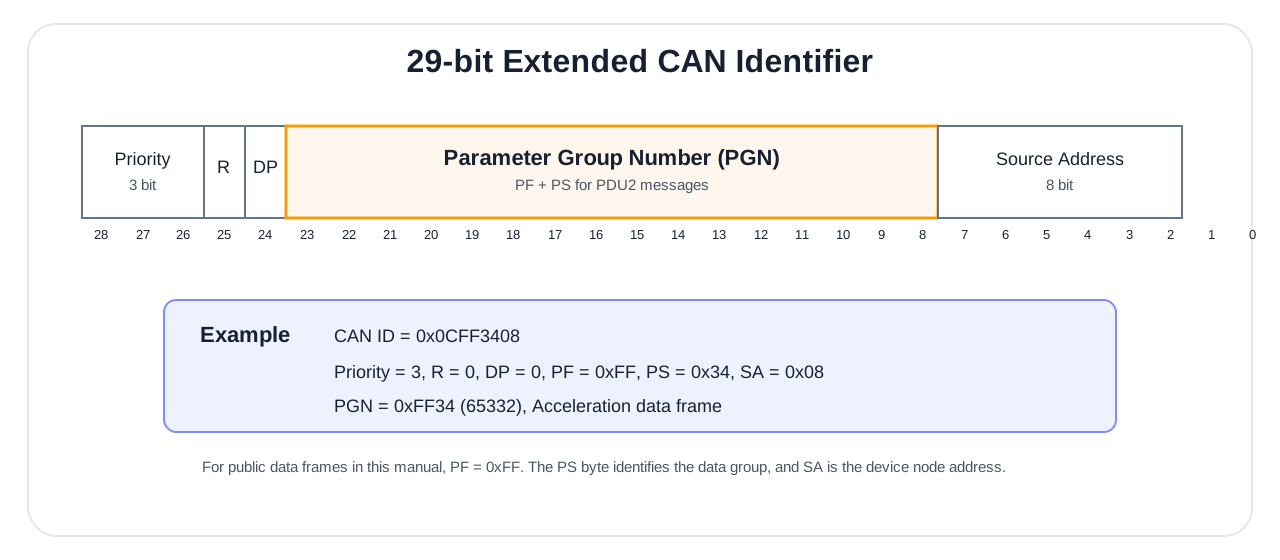
CAN_ID = (P<<26)|(R<<25)|(DP<<24)|(PF<<16)|(PS<<8)|SASee the figure above for the P/R/DP/PF/PS/SA bit fields. All data PGNs of this product use a manufacturer-specific format (PF=0xFF); for each data PGN, see "PGN Message List".
WARNING
Byte order: The J1939 data field is little-endian (low byte first). For example, the 32-bit value 0x12345678 appears in the frame as 78 56 34 12.
Protocol Parameters
| Parameter | Default | Options / Notes |
|---|---|---|
| CAN nominal baud rate | Typically 500 kbit/s for classic CAN; 1 Mbit/s for CANFD83 | Use the current device configuration; CANFD83 typically uses a 4 Mbit/s data phase |
| Frame format | Extended frame (29-bit) | Classic PGNs use CAN 2.0B; CANFD83 uses CAN FD, FD=1, BRS=1 |
| Data length | 8 bytes for classic PGNs | CANFD83 uses 12–64 bytes, determined by MAP and a valid DLC |
| Frame priority | 3 | 0–7, 0 highest |
| Node address | 8 | Publicly recommended to use 1–126; 127 is reserved on some models. Data PGNs are sent to broadcast address 255; do not set the device to 255 |
| Data format | Little-endian | Multi-byte, low byte first |
PGN Message List
The following table lists the public data PGNs. With priority 3, the CAN ID is 0x0CFF[PS][SA].
| PGN (hex) | PGN (decimal) | PS | Name | Applicability |
|---|---|---|---|---|
| 0xFF2F | 65327 | 0x2F | Time information (UTC or local run time) | All |
| 0xFF34 | 65332 | 0x34 | Three-axis acceleration | All |
| 0xFF37 | 65335 | 0x37 | Three-axis angular rate | All |
| 0xFF3A | 65338 | 0x3A | Three-axis magnetic field strength | 9-axis products |
| 0xFF3D | 65341 | 0x3D | Pitch/roll angle | All |
| 0xFF41 | 65345 | 0x41 | Heading angle | All |
| 0xFF46 | 65350 | 0x46 | Quaternion | All |
| 0xFF4A | 65354 | 0x4A | Inclinometer output | Inclinometer products |
| 0xFF43 | 65347 | 0x43 | Temperature | All |
| 0xFF5B | 65371 | 0x5B | CANFD83 variable frame | CAN FD supported and CANFD83 enabled in firmware |
Classic CAN PGN data fields follow (unlisted bytes are reserved, fixed 0); CANFD83 is defined separately below.
0xFF2F Time information
| Byte | Field | Type | Unit | Notes |
|---|---|---|---|---|
| 0–5 | Year/Month/Day/Hour/Minute/Second | uint8×6 | — | Year, e.g. 24=2024 |
| 6–7 | Milliseconds | uint16 | ms | Little-endian |
Example: CAN ID 0x0CFF2F08, data 18 06 12 0E 1E 2D 58 02 → 2024-06-18 14:30:45.600 UTC.
After UTC time synchronization is complete, 0xFF2F outputs valid UTC year/month/day/hour/minute/second; when UTC synchronization is not complete, the year/month/day fields are 0, and the hour/minute/second/millisecond come from the local 24 h wrap-around time and must not be treated as absolute UTC. The synchronization state is judged by MAIN_STATUS.UTC_UNSYNC.
0xFF34 Acceleration / 0xFF37 Angular rate / 0xFF3A Magnetic field (same structure, different scale factors; full scale: acceleration ±16 G, angular rate ±2000°/s, magnetic field ±1000 μT)
| Byte | Field | Type | Scale factor | Unit |
|---|---|---|---|---|
| 0–1 | X | int16 | acceleration 0.00048828 / angular rate 0.061035 / magnetic field 0.030517 | G / deg/s / μT |
| 2–3 | Y | int16 | same as above | same as above |
| 4–5 | Z | int16 | same as above | same as above |
0xFF3D Pitch/roll
| Byte | Field | Type | Scale factor | Unit |
|---|---|---|---|---|
| 0–3 | Roll | int32 | 0.001 | deg |
| 4–7 | Pitch | int32 | 0.001 | deg |
0xFF41 Heading (two representations in one frame, see "Heading (yaw) Convention")
| Byte | Field | Type | Scale factor | Unit |
|---|---|---|---|---|
| 0–3 | Compass heading (0–360°, clockwise positive; always Right-Front-Up) | uint32 | 0.001 | deg |
| 4–7 | Heading (±180°, counter-clockwise positive; follows the output data axes) | int32 | 0.001 | deg |
Under ROS in 9-axis mode, bytes 4–7 read 90° more than under Right-Front-Up; bytes 0–3 do not change.
0xFF46 Quaternion
| Byte | Field | Type | Scale factor |
|---|---|---|---|
| 0–1 / 2–3 / 4–5 / 6–7 | qw / qx / qy / qz | int16 | 0.0001 |
0xFF4A Inclinometer (inclinometer products)
| Byte | Field | Type | Scale factor | Unit |
|---|---|---|---|---|
| 0–3 | X-axis inclination (configurable 0–360° or ±180°) | int32 | 0.001 | deg |
| 4–7 | Y-axis inclination (±90°) | int32 | 0.001 | deg |
0xFF43 Temperature
| Byte | Field | Type | Scale factor | Unit |
|---|---|---|---|---|
| 0–1 | Temperature | int16 | 0.01 | °C |
| 2–3 | Reserved | — | — | Fixed 0 |
| 4–7 | Reserved | uint32 | — | Fixed placeholder value 999; not pressure, do not parse as pressure |
CANFD83 Variable Frame
For products with CAN FD support and CANFD83 enabled in firmware. Typical nominal and data-phase rates are 1 Mbit/s and 4 Mbit/s; use the device's current settings. Bus devices must support CAN FD.
PGN=0xFF5B, priority 3, extended ID=0x0CFF5B00 | node_id, FD=1, BRS=1.
Frame Format
The 8-byte header is followed by selected fields in ascending MAP bit order. Multi-byte integers and IEEE 754 float32 values are little-endian.
| Offset | Bytes | Field | Type | Notes |
|---|---|---|---|---|
| 0 | 4 | MAP | uint32 | Field bitmap |
| 4 | 2 | main_status | uint16 | See MAIN_STATUS; bit12=0 |
| 6 | 1 | ins_status | uint8 | Navigation status |
| 7 | 1 | sequence | uint8 | Encoding sequence, wrapping at 0–255 |
| bit | Field | Type | Bytes | Unit | Order / Meaning |
|---|---|---|---|---|---|
| 0 | ACC_B | float32×3 | 12 | m/s² | X, Y, Z |
| 1 | GYR_B | float32×3 | 12 | rad/s | X, Y, Z |
| 2 | MAG_B | float32×3 | 12 | μT | X, Y, Z; requires a magnetometer |
| 3 | RPY | float32×3 | 12 | deg | roll, pitch, yaw; yaw is ±180° |
| 4 | QUAT | float32×4 | 16 | — | w, x, y, z |
| 5 | SYSTEM_TIME | uint64 | 8 | μs | Monotonic IMU sample time |
| 6 | UTC | packed | 8 | — | See below |
| 8 | TEMPERATURE | float32 | 4 | °C | Temperature |
UTC layout: year-2000:u8, month:u8, day:u8, hour:u8, minute:u8, second*1000+ms:u16le, reserved:u8=0. Without a valid date, year=0; synchronization status is MAIN_STATUS bit11.
The supported-bit mask is 0x0000017F. MAP must be nonzero, contain no reserved bits, and satisfy logical length 8 + sum of selected field sizes ≤ 64. Selecting 0x17F requires 92 bytes and is rejected, leaving the previous MAP unchanged.
Default MAP=0x0000012B has a logical length of 56 bytes and a bus length of 64 bytes (DLC=15), padded with zeros. Other configurations also round up to the next valid length; exclude padding from decoded fields.
| CAN FD data bytes | 12 | 16 | 20 | 24 | 32 | 48 | 64 |
|---|---|---|---|---|---|---|---|
| DLC code | 9 | 10 | 11 | 12 | 13 | 14 | 15 |
J1939 Configuration
Use the configuration protocol: classic CAN, 8 bytes, FD=0, BRS=0.
| Parameter | Address | Default | Application |
|---|---|---|---|
| CANFD83 MAP | 0x0180 | 0x12B | Next frame |
| CANFD83 period | 0x015B | 0 (off) | Immediate, in ms |
| Periodic master switch | 0x009D | 1 (on) | Immediate, 0/1 |
| Data-phase rate index | 0x009B | 11 | Saved; reboot required |
Periodic output requires the master switch to be 1. 0x8000 selects SYNC_IN triggering where supported; other nonzero 16-bit values specify the period in ms. Data-phase rate indices: 0=1 Mbit/s, 10=2 Mbit/s, 11=4 Mbit/s. The nominal-rate address is 0x009A.
For node 8 and host 0x55, request ID=0x0CEF0855 and response ID=0x0CEF5508. Successful writes echo the request; reads return the current value. Invalid MAP/address requests receive no response.
| Operation | Request data (8 bytes) |
|---|---|
| MAP = 0x12B | 80 01 06 00 2B 01 00 00 |
| Read MAP | 80 01 03 00 00 00 00 00 |
| Period = 10 ms | 5B 01 06 00 0A 00 00 00 |
Frame Example
Constructed test data, not a hardware capture: ID=0x0CFF5B08, FD=1, BRS=1, DLC=15.
2B 01 00 00 00 00 00 7E
00 00 80 3F 00 00 00 C0
00 00 18 41 00 00 80 3E
00 00 00 BF 00 00 80 3F
00 00 20 41 00 00 A0 C1
00 00 F0 41 40 42 0F 00
00 00 00 00 00 00 CC 41
00 00 00 00 00 00 00 00
Decoded: ACC_B=[1, -2, 9.5] m/s², GYR_B=[0.25, -0.5, 1] rad/s, RPY=[10, -20, 30] deg, SYSTEM_TIME=1000000 μs, TEMPERATURE=25.5 °C. The last 8 bytes are padding.
Configuration Protocol
The host reads and writes device parameters through a dedicated configuration PGN.
Configuration frame format: CAN ID = 0x0CEF[DA][SA] (DA = product node ID or broadcast 255, SA = host address). Data payload:
| Byte | Field | Type | Notes |
|---|---|---|---|
| 0–1 | ADDR | uint16 | Parameter address (little-endian); for values, see the configuration examples below |
| 2 | CMD | uint8 | 0x06=write, 0x03=read |
| 3 | Reserved | uint8 | Echoed back verbatim by the device (does not carry a status code); host writes 0 |
| 4–7 | VAL | uint32 | Data value (little-endian) |
Configuration response rules:
| Request type | Responds? | Response CAN ID | Host handling |
|---|---|---|---|
| Point-to-point write (DA = specific node ID) | Yes | 0x0CEF55[node ID] | On successful write, returns a request echo |
| Point-to-point read (DA = specific node ID) | Yes | 0x0CEF55[node ID] | On successful read, returns ADDR + CMD + VAL |
| Broadcast write (DA = 255) | No | — | Does not wait for a response; read back to confirm if necessary |
| Illegal address, value out of range, or unsupported access | No | — | Judged as failure by timeout |
The response has destination address 0x55 and source address equal to the device node ID; e.g. the response CAN ID for node 8 is 0x0CEF5508. To simplify receive filtering, the host is recommended to use SA=0x55 when sending configuration requests.
The PGN transmit period is set by writing the period parameter via a configuration frame. Only the period parameters listed in the table below are public configuration items; unlisted parameters are not a general user interface.
Common configuration examples (default node ID=8):
[VAL] is always a 4-byte uint32 little-endian. A 100 ms period is written as 64 00 00 00; SYNC_IN trigger mode is written as 00 80 00 00.
| Data payload | Notes |
|---|---|
2F 01 06 00 [VAL] | PGN 0xFF2F (time information) transmit period |
34 01 06 00 [VAL] | PGN 0xFF34 (acceleration) transmit period |
37 01 06 00 [VAL] | PGN 0xFF37 (angular rate) transmit period |
3A 01 06 00 [VAL] | PGN 0xFF3A (magnetic field) transmit period |
3D 01 06 00 [VAL] | PGN 0xFF3D (pitch/roll) transmit period |
41 01 06 00 [VAL] | PGN 0xFF41 (heading) transmit period |
46 01 06 00 [VAL] | PGN 0xFF46 (quaternion) transmit period |
4A 01 06 00 [VAL] | PGN 0xFF4A (inclinometer) transmit period |
43 01 06 00 [VAL] | PGN 0xFF43 (temperature) transmit period |
5B 01 06 00 [VAL] | PGN 0xFF5B (CANFD83) period, off by default; see CANFD83 |
80 01 06 00 [VAL] | CANFD83 MAP, subject to the supported-bit and 64-byte length limits |
9B 00 06 00 [VAL] | CAN FD data-phase rate index; saved, reboot required; see CANFD83 |
06 00 06 00 [VAL] | Operating mode, values as in "CONFIG ATT MODE"; save, then reset to apply |
07 00 06 00 [VAL] | Output data axes: 0 = Right-Front-Up, 4 = ROS, see Output Data Axes; save, then reset to apply |
A6 00 06 00 [VAL] | Mounting orientation code, see Mounting Orientation; save, then reset to apply; a saved attitude zero stops applying |
A5 00 06 00 [VAL] | Attitude control: VAL=0 zero all / 1 heading reset / 2 set relative zero / 3 auto-level / 5 cancel leveling; see attitude reset persistence for saving and verification |
9D 00 06 00 01 00 00 00 | Globally enable node data output (default) |
9D 00 06 00 00 00 00 00 | Globally disable node data output |
9A 00 06 00 [VAL] | CAN baud rate: 0=1000K, 1=800K, 2=500K, 3=250K, 4=125K; save using the shared procedure, then reset or power-cycle to apply |
9C 00 06 00 [VAL] | J1939 node ID: recommended 1–126; 127 is reserved on some models; save using the shared procedure, then reset or power-cycle to apply |
9E 00 06 00 [VAL] | Inclinometer X-axis direction: 0=default, 1=reversed |
9F 00 06 00 [VAL] | Inclinometer Y-axis direction: 0=default, 1=reversed |
00 00 06 00 00 00 00 00 | Save configuration |
00 00 06 00 01 00 00 00 | Restore factory defaults (auto-save and reset) |
00 00 06 00 FF 00 00 00 | Reset |
Period VAL notes: 0 = off; 5/10/20/50/100/200/500/1000 ms are recommended periods; 0x8000 is SYNC_IN trigger mode.
WARNING
special period value 0x8000 (SYNC_IN trigger mode): After writing a PGN's transmit period as 0x8000, that PGN is no longer sent periodically and instead outputs one frame on the external SYNC_IN rising edge. For example, setting the VAL of 34 01 06 00 to 00 80 00 00 puts the acceleration PGN into SYNC_IN trigger mode. The standard firmware has this trigger path wired in; whether custom firmware supports it is subject to the delivery notes.
NOTE
Example: ID=0x0CEF0855, data 37 01 06 00 64 00 00 00 → sets PGN 0xFF37 (angular rate) to a 100 ms period (10 Hz). In this example DA=0x08, SA=0x55; SA can be any host address. If the host filters reception by the response destination address, fix SA=0x55.
Time Synchronization
J1939 PGN 0xFF2F is used only to output the module's current time information, not as a time-sync input. If you need to synchronize the module's internal clock to UTC, use the PPS + serial time message scheme in "Synchronization Function".
CANopen (CAN)
J1939 is recommended for new CAN integrations. CANopen support is being gradually phased out across product models. This section remains available for existing integrations; support depends on the delivered model and firmware, and this does not mean all existing devices have lost CANopen support.
Some products or delivery configurations support CANopen slave communication (whether enabled is subject to the actual model). CANopen uses standard data frames, with common data transmitted via TPDO1/2/3/4/6/7; remote frames and extended frames are not used. TPDOs are triggered asynchronously on a timer; for synchronous mode, see "TPDO Rate and Synchronization Configuration".
Default Settings
| Item | Value |
|---|---|
| CAN nominal baud rate | Typically 500 kbit/s for classic CAN; CANFD83 devices use their current nominal rate (typically 1 Mbit/s) |
| Node ID | 8 |
| Initialization state | Operational |
| TPDO output period | Default 0 = no active output; transmission starts only after each TPDO period is written via SDO (see "TPDO Rate and Synchronization Configuration") |
WARNING
By factory default, all TPDO periods are 0 (no output). After power-on, CANopen does not actively send data; you must first configure the output period of the required TPDOs per "TPDO Rate and Synchronization Configuration".
TPDO Mapping
| Channel | Frame ID | DLC | Data | Type / Scale / Unit |
|---|---|---|---|---|
| TPDO1 | 0x180+ID | 6 | Acceleration X/Y/Z | int16, mG (0.001 G) |
| TPDO2 | 0x280+ID | 6 | Angular rate X/Y/Z | int16, 0.1 deg/s |
| TPDO3 | 0x380+ID | 6 | Euler angles Roll/Pitch/Yaw | int16, 0.01 deg |
| TPDO4 | 0x480+ID | 8 | Quaternion W/X/Y/Z | int16, raw × 0.0001; raw=10000 → 1.0000 |
| TPDO6 | 0x680+ID | 4 | Pressure | int32, Pa |
| TPDO7 | 0x780+ID | 8 | Inclinometer X/Y | int32, 0.01 deg |
All multi-byte fields are low byte first.
WARNING
scale factors differ from other protocols: CANopen acceleration is in mG, angular rate 0.1 deg/s, Euler angles 0.01 deg; do not apply the Modbus/J1939 scale factors (see "Unified Data Dictionary").
Data Parsing Examples
The following examples assume the corresponding TPDO period has been opened per "TPDO Rate and Synchronization Configuration".
Acceleration frame: ID=0x188 (node 8), data 4A 00 1F 00 C8 03
- X = 0x004A = 74 → 74 mG; Y = 0x001F = 31 → 31 mG; Z = 0x03C8 = 968 → 968 mG
Angular rate frame: ID=0x288, data 15 00 14 01 34 00
- X = 0x0015 = 21 → 2.1 deg/s; Y = 0x0114 = 276 → 27.6 deg/s; Z = 0x0034 = 52 → 5.2 deg/s
The host can use PCAN-View with a PCAN adapter to view in the receive window:
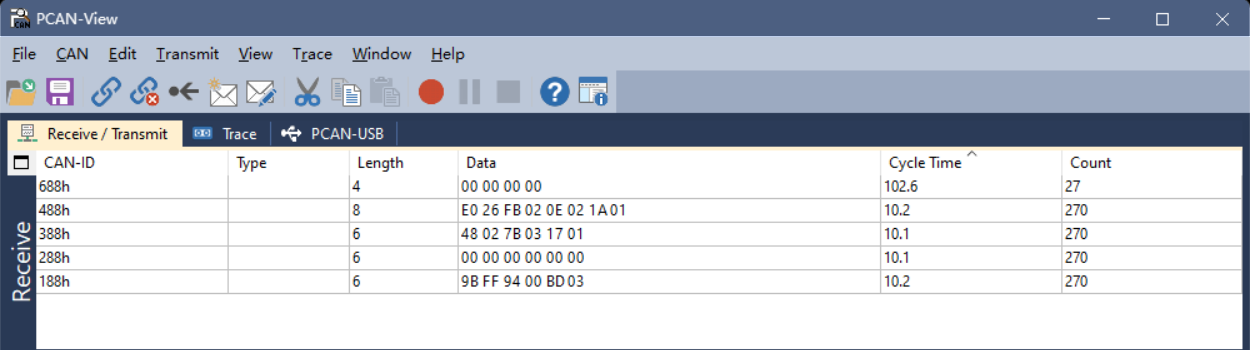
Configuration Commands (SDO)
CANopen expedited SDO is used. The host sends CAN_ID=0x600+ID, and the slave responds with CAN_ID=0x580+ID. The SDO data area is a fixed 8 bytes:
CS | Index_L | Index_H | SubIndex | Data0 | Data1 | Data2 | Data3Both Index and Data are little-endian. Common CS values are as follows:
| CS | Direction | Meaning | Data bytes |
|---|---|---|---|
| 0x23 | Host→Slave | Write 4 bytes | 4 |
| 0x2B | Host→Slave | Write 2 bytes | 2 |
| 0x2F | Host→Slave | Write 1 byte | 1 |
| 0x40 | Host→Slave | Read request | 0 |
| 0x60 | Slave→Host | Write success response | 0 |
| 0x43 | Slave→Host | Read 4-byte response | 4 |
| 0x4B | Slave→Host | Read 2-byte response | 2 |
| 0x4F | Slave→Host | Read 1-byte response | 1 |
| 0x80 | Slave→Host | SDO abort | 4-byte abort code |
This product configures common public parameters through manufacturer object indices. The table below lists only the public objects defined in this manual; unlisted objects are not a general user interface—do not derive or access them via manufacturer object indices that are not listed. Multi-byte values are arranged in little-endian when written or read. If the device denies access, it returns a 0x80 abort response; common abort codes are 0x06090030 (value out of range) and 0x06010000 (access not supported).
Common commands (using node ID=8, CAN_ID=0x608 as an example):
| Operation | Data |
|---|---|
| Modify node ID (0x209C, recommended 1–126; 127 is reserved on some models) | 23 9C 20 00 [ID] 00 00 00 |
| Save configuration (0x2000) | 23 00 20 00 00 00 00 00 |
| Reset (0x2000) | 23 00 20 00 FF 00 00 00 |
| Restore factory defaults (0x2000) | 23 00 20 00 01 00 00 00 |
| CAN baud rate 1000K (0x209A) | 23 9A 20 00 00 00 00 00 |
| CAN baud rate 800K | 23 9A 20 00 01 00 00 00 |
| CAN baud rate 500K | 23 9A 20 00 02 00 00 00 |
| CAN baud rate 250K | 23 9A 20 00 03 00 00 00 |
| CAN baud rate 125K | 23 9A 20 00 04 00 00 00 |
| Attitude relative zero (0x20A5) | 23 A5 20 00 02 00 00 00 |
| Auto-level | 23 A5 20 00 03 00 00 00 |
| Cancel leveling / restore absolute angles | 23 A5 20 00 05 00 00 00 |
| Read node ID (0x209C) | 40 9C 20 00 00 00 00 00 |
NOTE
CANopen parameter persistence: The TPDO period (0x180x.5) and heartbeat (0x1017) take effect immediately after being written; the CAN baud rate (0x209A) and node ID (0x209C) take effect only after a reset (write 0xFF to 0x2000), and after reset the host must also switch to the new baud rate / new node ID. For compatibility across firmware versions, after configuration it is recommended to write 0x00 to 0x2000 to save configuration.
WARNING
After restoring factory defaults, the module automatically saves and resets; use with caution.
TPDO Rate and Synchronization Configuration
TPDO channels map to parameter indices:
| Channel | Parameter index | Data |
|---|---|---|
| TPDO1 | 0x1800 | Acceleration |
| TPDO2 | 0x1801 | Angular rate |
| TPDO3 | 0x1802 | Euler angles |
| TPDO4 | 0x1803 | Quaternion |
| TPDO6 | 0x1804 | Pressure |
| TPDO7 | 0x1805 | Inclinometer |
TPDO5 is unused; to remain compatible with existing product definitions, pressure uses TPDO6 and the inclinometer uses TPDO7.
Modify output rate (write sub-index 5, unit ms; 0=off), using acceleration (0x1800) as an example:
2B 00 18 05 00 00 00 00— off (period=0)2B 00 18 05 05 00 00 00— 200 Hz (period=5 ms)2B 00 18 05 0A 00 00 00— 100 Hz (period=10 ms)2B 00 18 05 14 00 00 00— 50 Hz (period=20 ms)2B 00 18 05 32 00 00 00— 20 Hz (period=50 ms)2B 00 18 05 64 00 00 00— 10 Hz (period=100 ms)
For the other channels, change the low byte of the index (the 2nd byte of the frame) to 01 (angular rate) / 02 (Euler angles) / 03 (quaternion) / 04 (pressure) / 05 (inclinometer); for example, angular rate at 100 Hz: 2B 01 18 05 0A 00 00 00. This item (rate, sub-index 5) takes effect immediately after being written and is automatically persisted (retained across power loss), with no extra save needed.
Synchronous mode: Writing a TPDO's transmission type [0x180x.2] as 0x01 switches it to synchronous mode (stops asynchronous timing and waits for the sync frame). Using TPDO1 as an example:
2F 00 18 02 01 00 00 00— set TPDO1 to synchronous mode2F 00 18 02 FF 00 00 00— restore TPDO1 to asynchronous mode (default)
Send a CANopen sync frame: CAN_ID=0x80, empty data. All TPDOs in synchronous mode each send one frame, achieving synchronization.
NOTE
The transmission type (synchronous / asynchronous) is a runtime-only setting and reverts to the asynchronous default (0xFF) after reset or power cycle; it is not retained across power loss. The TPDO rate (sub-index 5) and heartbeat period, however, are retained across power loss.
Heartbeat: Write [0x1017.0] to set the period (ms, 0 disables). Example 2B 17 10 00 64 00 00 00 → 100 ms.
Fault Diagnosis
Start with the symptom, then consult the corresponding reference. For communication problems, check wiring and current configuration first; do not make factory reset or firmware upgrade the first step.
| Symptom | Check first | Next step |
|---|---|---|
| No serial or Modbus response | Power, wiring, port and baud rate; ASCII \r\n termination, Modbus node ID and request CRC | Repeat read-only verification in Quick Start Procedure; for ASCII errors, check error codes |
| Communication lost after configuration | Host baud rate / node ID matches the device's effective settings; save, reset and switching sequence | Review Changing Communication Parameters |
| Expected CAN data missing | Delivered protocol, wiring, termination, current bit rate, standard / extended frame selection, and FD/BRS settings for CANFD83 | Check CAN integration, then the protocol's output configuration |
| Frames received but decoded values incorrect | Frame length, CRC, offsets, types, byte order and scale factors; parse HI83 using each frame's bitmap | Check Decoding Pitfalls, protocol tables and the Unified Data Dictionary |
| Unexpected attitude direction or heading | Mounting orientation, output data axes and 6-axis / 9-axis mode; do not treat relative heading as magnetic heading; Right-Front-Up and ROS have opposite pitch signs and 9-axis headings 90° apart; a saved zero stops applying after the mounting orientation changes | Check Coordinate Systems, Mounting Orientation, Output Data Axes and attitude zeros; for 9-axis issues, continue with Magnetic Calibration |
| Calibration fails or heading remains abnormal | Calibration status, fixed mounting, magnetic environment and rotation coverage | Follow the calibration troubleshooting procedure |
If unresolved, provide the product model, firmware version, interface and current communication settings, operation sequence, and raw transmitted/received messages. For attitude or heading issues, also describe the mounting orientation and environment.
Appendix A — Quaternion / Euler Angles / Rotation Matrix Conversions
This appendix presents the attitude representations adopted by HiPNUC products and the formulas for converting between them. The quaternion order is WXYZ (COORD 0) uses the 312 formulas and ROS (COORD 4) the 321 formulas; see Coordinate Systems and Direction Conventions for their axes. The two have different body axes: to convert between them, extract the Euler angles from the quaternion with the matching formulas; do not add 90° to one of the angles.
Quaternion to Rotation Matrix
Given the quaternion
East-North-Up (ENU) — 312 rotation order (Z first, then X, then Y)
Euler angle definitions under the ENU convention:
- pitch (θ): rotation angle about the X axis, range
- roll (φ): rotation angle about the Y axis, range
- yaw (ψ): rotation angle about the Z axis, range
Quaternion to Euler angles:
Euler angles to quaternion (let
ROS (REP-103) — 321 rotation order (Z first, then Y, then X)
Under ROS the body frame is Front-Left-Up (FLU) and the world frame is East-North-Up (ENU); the 9-axis heading is 0 with the nose pointing east, and relative-heading modes such as 6-axis start at 0 at power-on:
- roll (φ): rotation angle about the X axis, range
- pitch (θ): rotation angle about the Y axis, range
- yaw (ψ): rotation angle about the Z axis, range
Quaternion to Euler angles:
Euler angles to quaternion (let
These 321 formulas are the same as the Euler extraction commonly used with North-East-Down (NED) in aviation; only the axis directions differ. This manual defines no NED output configuration.
Appendix B — Firmware Upgrade
This product supports firmware upgrade. Contact technical support with the product model and the LOG VERSION output so that the applicable firmware file (.hex) can be confirmed; do not use firmware for another model. Then use CHCenter and follow the steps shown below.
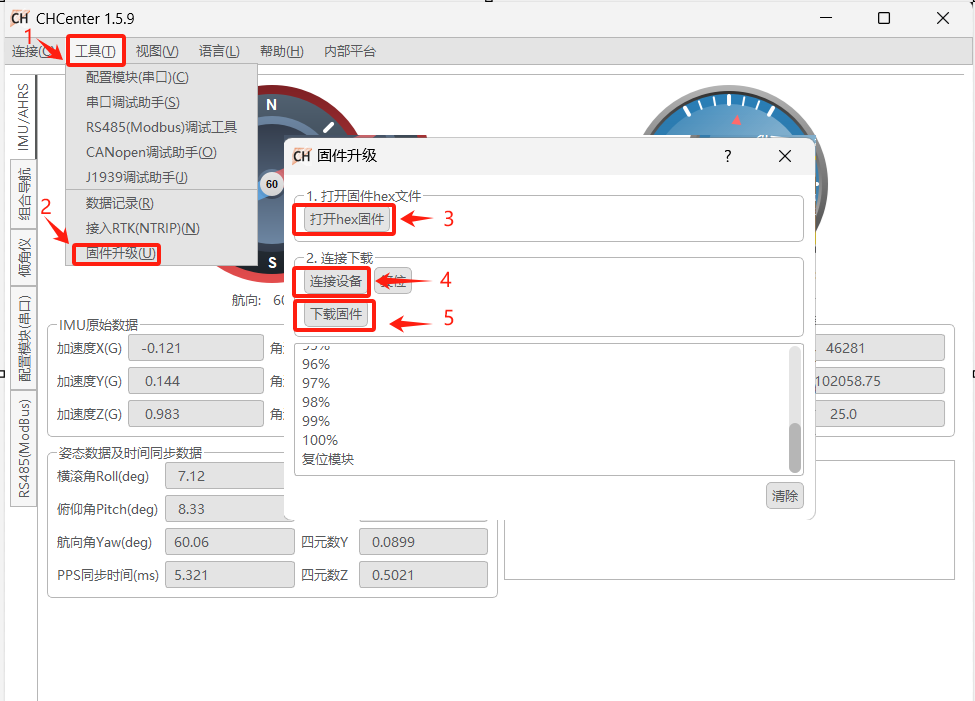
NOTE
Before upgrading, confirm that the firmware version matches the product model (see the version cross-reference table in "About This Manual"). Do not power off during the upgrade.
Appendix C — Output Bandwidth and Baud Rate
Whether a data frame can be output stably depends on whether frame length × frame rate stays within the serial bandwidth. Estimating with 8N1 (10 bit per byte):
In practice, it is recommended to reserve an additional 10–20% margin on top of the formula above. An HI91 frame is 82 bytes total (6 bytes of header/length/CRC + 76-byte payload); the recommended maximum output frame rate at each baud rate:
| Protocol | Bytes per frame | 9600 | 115200 | 230400 | 460800 | 921600 |
|---|---|---|---|---|---|---|
| HI91 | 82 | 10 Hz | 100 Hz | 250 Hz | 500 Hz | 1000 Hz |
NOTE
HI83 uses variable-length frames: its bytes per frame vary with the data_bitmap configuration. Sum the frame length according to the selected fields and substitute it into the formula above for estimation. For example, with the default 0x000000FF (bit0–7), a frame is about 98 bytes (payload 92 + 6 bytes of header/length/CRC); 100 Hz requires about 98 kbit/s, for which 115200 leaves a tight margin and 230400 or higher is recommended. When a high frame rate conflicts with the default 115200 bandwidth, raise the baud rate (e.g. 921600).
Appendix D — Factory Default Configuration
The table below lists typical factory defaults; the actual delivered configuration prevails. The "Effective Timing" column explains when a change takes effect. For saving, see SAVECONFIG in "System Commands".
| Configuration Item | Typical Default | Available Range | Effective Timing |
|---|---|---|---|
| Serial baud rate (COM1–4) | 115200 | 4800…921600 (9 steps, see "System Commands") | Immediately (SERIALCONFIG) |
| Default output frame | HI91 @ 100 Hz (COM1, COM2) | — | Immediately (LOG) |
| Other frames (HI83, etc.) | Off | — | Immediately |
| Operating mode | See product delivery (6-axis / 9-axis) | CONFIG ATT MODE | Loaded after reset / power cycle |
| Output data axes COORD | Right-Front-Up (0) | Right-Front-Up / ROS | Loaded after reset / power cycle |
| Mounting orientation URFR | 24 (horizontal, Z up) | See "Mounting Orientation" | Loaded after reset / power cycle |
| HI83 data_bitmap | 0x000000FF | See "Variable-Type Data Frame (HI83)" | Restart after changing, then read back to verify |
| Modbus node ID | 80 | 1–247 | Immediately |
| CAN node ID | 8 | Recommended 1–126; 127 reserved on some models | Reset / power cycle |
| CAN nominal baud rate | Typically 500 kbit/s for classic CAN; 1 Mbit/s for CANFD83 | Use the device's current configuration | Reset / power cycle |
| CANFD83 MAP / period / data-phase rate | 0x12B / 0 (off) / 4 Mbit/s | See CANFD83 | Next frame / immediate / reboot |
| J1939 periodic output master switch | On | 0 / 1 | J1939 write: immediate |
| J1939 default output PGN | Acceleration / angular rate / pitch-roll / heading @ 100 Hz | See "J1939 Configuration Protocol" | Immediately |
| CANopen TPDO period | All 0 (no output) | See "TPDO Rate and Synchronization Configuration" | Immediately |
| CANopen heartbeat | Off (0) | 0–65535 ms | Immediately |
WARNING
Factory reset: Restores the default user configuration, including baud rates, outputs, operating mode, mounting orientation, output data axes and attitude zeros, and restarts. Record communication parameters and key configuration beforehand, then verify communication and output afterward.
Appendix E — Acronyms and Glossary
The abbreviations and technical terms used in this manual are summarized below (for command keywords such as LOG, CONFIG, SAVECONFIG, and FRESET, see "ASCII Command Reference").
| Abbreviation / Term | Full name / Meaning |
|---|---|
| IMU | Inertial Measurement Unit (accelerometer + gyroscope, optionally with magnetometer) |
| AHRS | Attitude and Heading Reference System (9-axis, absolute heading) |
| VRU | Vertical Reference Unit (6-axis, relative heading) |
| ENU | East-North-Up world frame (see "Coordinate Systems and Direction Conventions") |
| RFU / FLU | Right-Front-Up / Front-Left-Up body axes; FLU is the ROS body-axis convention |
| ROS / REP-103 | Robot Operating System and its coordinate convention: body Front-Left-Up, world East-North-Up (see "Output Data Axes") |
| URFR | Mounting orientation code: where the printed arrows point on the vehicle (see "Mounting Orientation") |
| COORD | Output data axes configuration (Right-Front-Up / ROS, see "Output Data Axes") |
| MAIN_STATUS | Main status word, 16-bit (see "MAIN_STATUS Status Word") |
| MCAL | Magnetometer Calibration (see "Magnetic Calibration and Magnetic Environment") |
| USRCAL | User-level gyroscope calibration, calibrates the gyroscope Z-axis scale factor (see "Attitude Calibration") |
| PMUX | Pin Multiplexing, multi-function IO multiplexing (see "Multi-function IO Multiplexing") |
| SOUT | Sync Output, pre-frame sync output pulse (see "SOUT Synchronous Output") |
| SYNC_IN / PPS | Sync pulse input / standard pulse-per-second, used for triggering and time synchronization (see "Synchronization Function") |
| HI91 / HI83 | HiPNUC binary data frame types: fixed-length floating-point / variable-length bitmap |
| SOF | Start of Frame, start-of-frame sync word (5A A5) |
| CRC | Cyclic Redundancy Check |
| PGN | Parameter Group Number (J1939) |
| SA / DA | Source / Destination Address (J1939) |
| TPDO | Transmit PDO, Transmit Process Data Object (CANopen cyclic output) |
| SDO | Service Data Object (CANopen configuration read/write) |
| DBC | CAN database file, describing CAN signal definitions, for import into CANoe / BusMaster, etc. (see Appendix "Development Resources and Technical Support") |
| EDS | Electronic Data Sheet, CANopen Electronic Data Sheet (object dictionary description file, see Appendix "Development Resources and Technical Support") |
| Heave / Surge / Sway | Heave / surge / sway, the three-axis periodic motion of a vessel (see "Wave Compensation / MRU Output") |
Appendix F — Development Resources and Technical Support
The following tools and resources are available for secondary development:
| Resource | Purpose | Where to Get It |
|---|---|---|
| CHCenter host software | Device connection, parameter configuration, data plotting / attitude visualization, data recording and playback, firmware upgrade | www.hipnuc.com |
| Binary parsing example | C-language frame parsing: frame reception, CRC check, field-table decoding | See "C Parsing Example (HI91)" |
| Firmware upgrade | Contact technical support to confirm the applicable firmware; upgrade via CHCenter | See Appendix B |
| DBC / EDS (CAN) | J1939 DBC and CANopen EDS machine-readable files for import into CANoe / BusMaster / PLC | Contact technical support |
Information about new products and resources is available on the official website and WeChat official account.
Website: www.hipnuc.com
WeChat official account:

Telegram: