
Troubleshooting & Firmware Upgrade
Symptom Checklist
| Symptom | Check First | Action |
|---|---|---|
| No serial response | Power, common GND, TX/RX swap, port name, RS-485 A/B polarity | Ensure uppercase + \r\n; send LOG VERSION at 115200 8N1; if silent, sweep baud rates per "Link Recovery" below |
Replies OK, no data frames | Streaming paused, period is 0, or set to ONMARK trigger | Send LOG ENABLE; check ONTIME with LOG COMCONFIG (RS-485 models do not stream by default) |
| All-zero or frozen values | Not converged yet, or wrong decoder byte offsets | Hold still ≥ 3 s after boot until MAIN_STATUS.ATT_CONV = 0; check that system_time increments and verify offsets |
| Link lost after baud change | SERIALCONFIG switches and saves immediately; host stayed at old rate | Switch host to the target baud rate, flush buffer, and verify with LOG COMCONFIG |
| No Modbus response | Periodic streaming still on, wrong parity (PLCs often default to Even instead of 8N1), short timeout, wrong slave ID / A-B | Disable streaming on non-RS-485 models; set host timeout ≥ 1 s; avoid broadcast ID 0; swap A/B if needed |
| No CAN frames | Bit-rate mismatch, missing 120 Ω resistors, no ACK node on bus | Try 500k, 1M, 250k, 125 kbit/s; attach an ACK-enabled CAN analyzer; check master switch 0x009D and PGN periods |
| No I2C ACK | Missing pull-ups on host board, address mismatch with MD_ID, no post-reset wait | Verify pull-ups; default address is 0x50; wait ≥ 150 ms after reset, then retry every 1 ms |
| Wrong attitude axes or signs | URFR / COORD mismatch, or stale zero offset after axis change | Check LOG USRCONFIG and run hand-tilt checks; send CONFIG ATT RST 5 to clear old zero offset before re-leveling |
| Heading drift or jumps | Natural 6-axis relative drift; 9-axis magnetic disturbance or missing calibration | Use 6-axis indoors or near motors; in 9-axis check MAIN_STATUS.MAG_DIST, move away from interference, and recalibrate |
| UTC stays unsynced | Missing PPS, wrong RMC baud/status, or ONMARK active | Confirm no port uses ONMARK (exclusive with PPS); verify 1 Hz RMC arrives < 1 s after PPS and check UTC_UNSYNC = 0 |
| Dropped frames at high rate | Frame size × rate exceeds serial bandwidth, or host read stalls | Raise baud rate, lower rate, or trim HI83 MAP per Baud Rate & Frame Rate Limits |
Link Recovery
Do not jump straight to a factory reset after misconfiguring a link. Recover in order:
- Check physical wiring: verify power, GND, TX/RX order, and port (try COM2 on dual-port models).
- Sweep baud rates: step the host through
115200 → 921600 → 460800 → 230400 → 256000 → 57600 → 38400 → 19200 → 9600 → 4800, sendingLOG VERSIONtwice (1 s apart) at each rate. If clean5A A5frames appear with no command reply, the baud rate is correct — inspect host TX and\r\n. - Scan bus addresses:
- Modbus: once baud rate matches, connect a single module and read
0x0005(MD_ID) across IDs1–247. - CAN: try
500k,1M,250k,125 kbit/sand node8first. If data frames appear, the lowest ID byte is the node address; otherwise read0x009Cacross nodes1–127.
- Modbus: once baud rate matches, connect a single module and read
- Record before editing: once connected, run
LOG COMCONFIGto note active settings. UseFRESETonly if full re-initialization is truly needed (see Factory Reset).
Firmware Upgrade
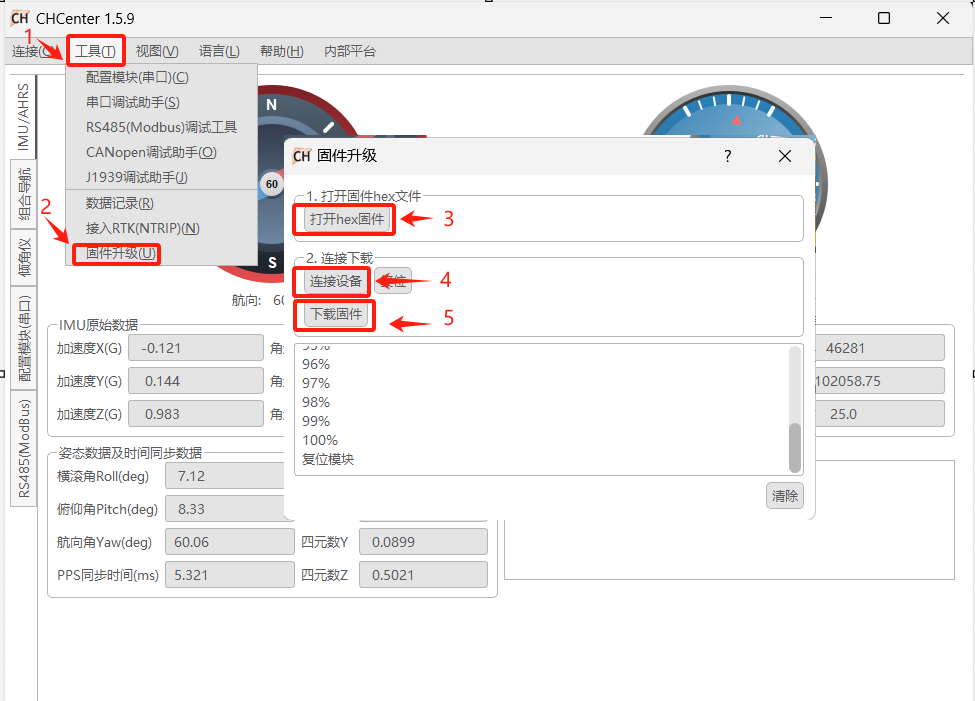
To upgrade firmware, contact technical support with your product model and the full LOG VERSION output to obtain the exact firmware file for that model (never flash firmware from another model). Upgrade using CHCenter as shown below:
WARNING
Save the outputs of LOG VERSION, LOG COMCONFIG, and LOG USRCONFIG before upgrading. Keep power and the link stable throughout the upgrade — never disconnect or power off mid-flash.
After upgrading, read back settings and compare with your backup. Upgrades may invalidate saved attitude zero offsets: redo ATT RST and save if used, and verify 360° heading closure for 9-axis applications.
Technical Support
When contacting technical support, please include:
- Complete
LOG VERSIONoutput (PNAME,BUILD,APP_VER) LOG COMCONFIGandLOG USRCONFIGoutputs- Photos of power and communication wiring
- Interface parameters, reproduction steps, and raw captured frames
Website: www.hipnuc.com
Telegram: